Everything
XgenPlus
can do.
Email, collaboration, AI and security for business, explained feature by feature. Written from the live product and the XgenPlus Help Center.

 XgenPlus Product Guide · Contents
What is inside
Read it end to end, or jump to your chapter. Every page links to the Help Center article behind it, so you can go from overview to step-by-step in one click.
Evaluating? Read chapters 1, 3, 10 and 14. Running it? Chapters 3, 11 and 13. Using it? Chapters 4 to 9 and 12.
Always up to date. The latest and most up-to-date information is always available at docs.xgenplus.com. The badges you see on pages (Web, Android, iPhone, AI, Security, Unique) come straight from the Help Center.
XgenPlus Product Guide · 01 What XgenPlus isWhat XgenPlus is
Enterprise business email and collaboration from India, in one browser window.
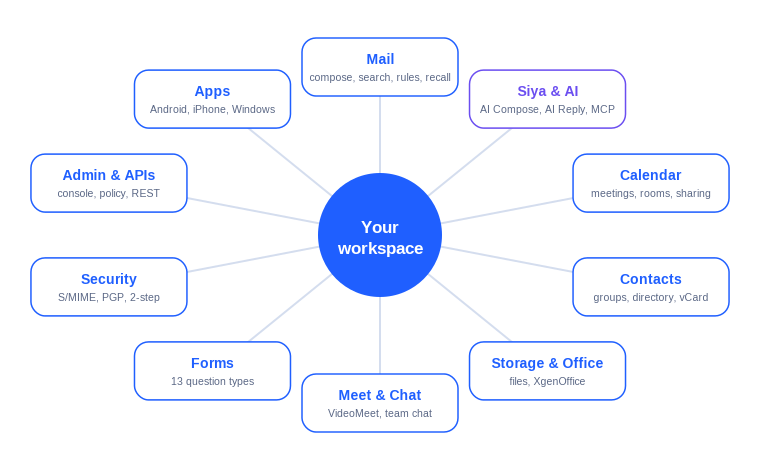
XgenPlus is enterprise business email and collaboration by Data XGen Technologies Pvt. Ltd. (India). One screen covers mail, calendar, contacts, tasks, notes, cloud storage, chat and video meetings.
 XgenPlus Product Guide · 01 What XgenPlus is
Built for how India works
Languages, standards and security are part of the product, not add-ons.
Only in XgenPlus
The Help Center marks these features as unique to XgenPlus.
Recall a sent mailReply with AI ReplySign in with a code from the mobile appSign in faster with a PINBook a room, food or a vehicleRecord and send minutes of meetingSend a personal copy to a contact groupHide attachments inside picturesAllow sign-in only from chosen countriesType in Hindi and other Indian languagesAI assistants over MCPRoute shared mailbox mail to agents XgenPlus Product Guide · 02 Who it is for
Who it is for
Four kinds of reader, one product. Find your path.
Sectors that use business email like this
XgenPlus serves organisations that need control over how mail is stored, secured and governed.
XgenPlus Product Guide · 02 Who it is forHosted or self-run?
Both run the same product. The choice is about who operates the servers.
| Hosted cloud | On-premise or private | |
|---|---|---|
| Who runs the servers | XgenPlus | Your team, or a private cloud |
| Install | Nothing to install. Point your MX records. | A Linux server. Installation is a vendor-led service. |
| Best for | Fast start, predictable cost per user | Sovereignty, air-gapped networks, deep control |
| Updates | Handled for you | Planned with your team |
| Pricing | Per user, billed annually | Per-user perpetual licence plus annual maintenance, quoted in writing |
Where XgenPlus is used
Public customer stories name government bodies, public-sector companies and enterprises. See the site for current references.
XgenPlus Product Guide · 03 ArchitectureArchitecture and deployment
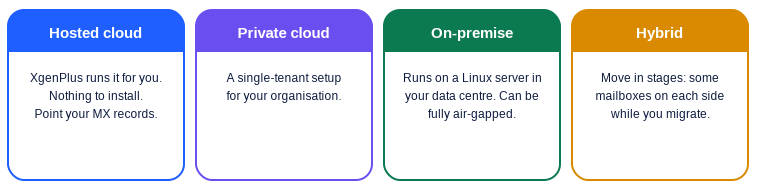
Four ways to run the same product, and how mail reaches you.
Hosted cloud
- Nothing to install for a hosted plan.
- Point your MX records to XgenPlus and sign in.
- Works in current Chrome, Edge, Firefox and Safari 14 or later. Internet Explorer is not supported.
- Mail apps connect with IMAP and SMTP at the same server names for every customer.
Self-run
- The XgenPlus mail server runs on Linux only. There is no Windows edition.
- Install in your data centre or a private cloud, or run fully air-gapped.
- Installation and migration are vendor-led services; see on-premise email on the site.
XgenPlus Product Guide · 03 ArchitectureFrom purchase to a working mailbox
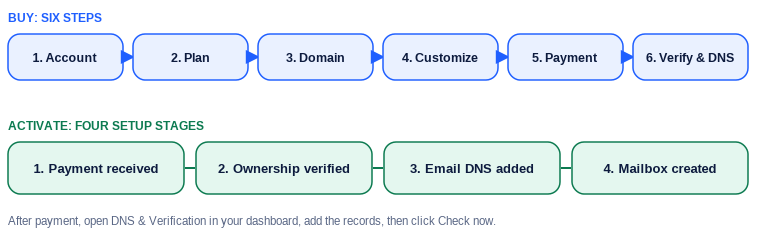
Setting up a hosted domain takes six steps to buy and four stages to activate.
DNS records at a glance
| Record | Type | Host | Value |
|---|---|---|---|
| Ownership | TXT | @ | The value shown for your domain |
| MX | MX | @ | mx1.xgenplus.com priority 5, mx2.xgenplus.com priority 10 |
| SPF | TXT | @ | v=spf1 mx ptr a:a.xgenplus.com ~all |
| DKIM | TXT | xgen._domainkey | The key from your dashboard (copy it, never retype) |
| DMARC | TXT | _dmarc | Recommended: v=DMARC1; p=quarantine; rua and ruf set to your abuse address |
| Autodiscover, Autoconfig | CNAME | autodiscover, autoconfig | mail.xgenplus.com (optional) |
XgenPlus Product Guide · 03 ArchitectureMail flow and moving in
Anti-spam sits in front of your mailbox. Importing is built in, so moving from Gmail or Microsoft needs no tools.

Move your mail in
| From | How |
|---|---|
| Gmail or Google Workspace | Settings › Import Mails › Google, sign in and allow access |
| Microsoft 365 or Outlook.com | Settings › Import Mails › Microsoft, sign in and allow access |
| Yahoo or Zoho | Settings › Import Mails › Yahoo or Zoho (OAuth2) |
| Any other IMAP server | Settings › Import Mails › Using IMAP: address, password or app password, IMAP server |
| Keep receiving at the old address | Settings › Connector: connect another mail account |
XgenPlus Product Guide · 03 ArchitectureSelf-run options
For organisations that need data sovereignty and control, XgenPlus can run in your own infrastructure.
| Standard | Enterprise | |
|---|---|---|
| Domains | Single and multi-domain | Everything in Standard |
| Mail and access | Webmail, SMTP, IMAP, POP3 | Plus high availability and load balancing |
| Protection | Anti-spam, anti-virus, encryption | Plus content filtering and data loss prevention |
| Operations | Backup, admin console, role-based access | Plus virtual servers and priority support |
Moving over
- Assess your mailboxes, domains and mail volume.
- Run in parallel while users test the new system.
- Cut over: move your MX records on a date you choose. The old server stays readable until you sign off.
XgenPlus Product Guide · 04 MailWrite, send, find, organise and protect your mail, from any device.
Write and send
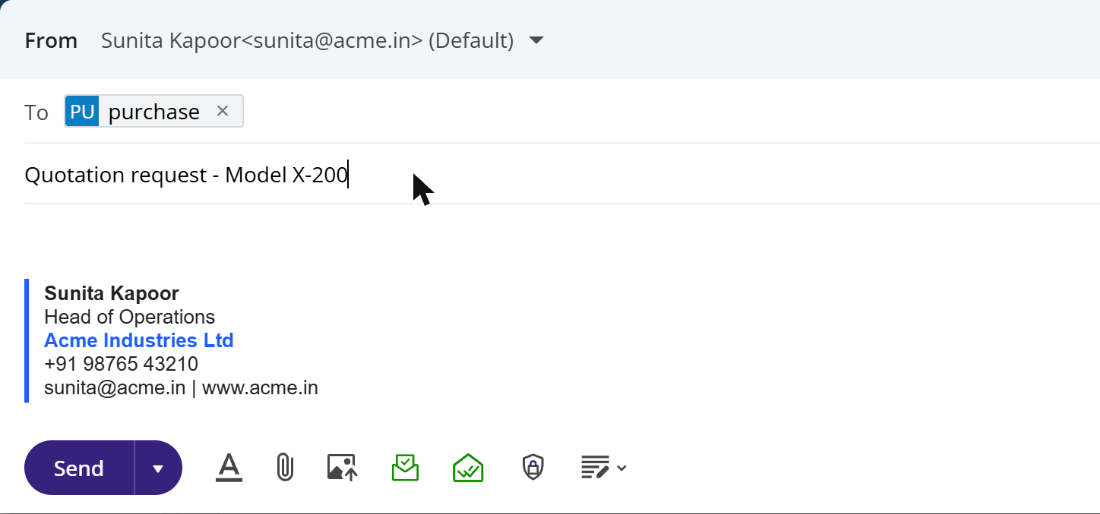
- Compose Mail opens a New Message window over your mailbox.
- Add Cc or Bcc, attach files, insert pictures, format text.
- Ask for a Delivery Report or Read Receipt with one click.
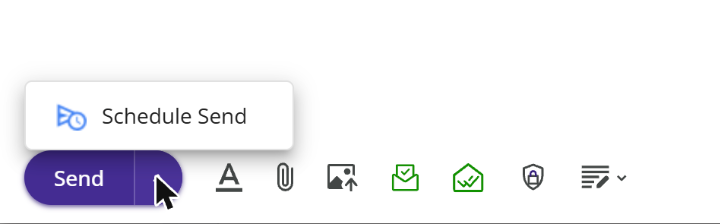
- Save a draft, or schedule the mail to send later.
- Classic compose adds rights, priority, PGP, templates and Group Mail.
XgenPlus Product Guide · 04 MailTake it back, track it, control it
Features that protect you after you click Send.
| Feature | What it does | Good to know |
|---|---|---|
| Undo Send | Countdown after Send; click Stop Mail to cancel | Turn on in Settings › Default Settings |
| Recall | Deletes the mail from colleagues who have not opened it | Works only for recipients on your organisation's XgenPlus |
| Rights after sending | Block reply, forward, print or delete for internal recipients | Needs the Rights feature enabled by your admin |
| Delivery report | Tells you the mail reached each recipient's server | Not available for mailing lists |
| Read receipt | Asks the recipient's mail app for a receipt | Not every app sends one |
| Reply awaited | Lists sent mails still waiting for an answer | Set it in Classic compose |
| Resend | Send a sent mail again | Available from Sent |
| Check outside recipients | Asks you to confirm external addresses before sending | Turned on by your admin |
Safety nets
- Forgotten attachment reminder in Classic compose when your text says attached but nothing is.
- Link Security Alert before you open a risky link, when your admin turns it on.
- Caution banner when you reply to outsiders.
- Quarantine holds suspicious mail for review.
XgenPlus Product Guide · 04 MailFind anything, keep it tidy
Search, folders, rules, tags and smart categories keep a busy mailbox under control.
Search
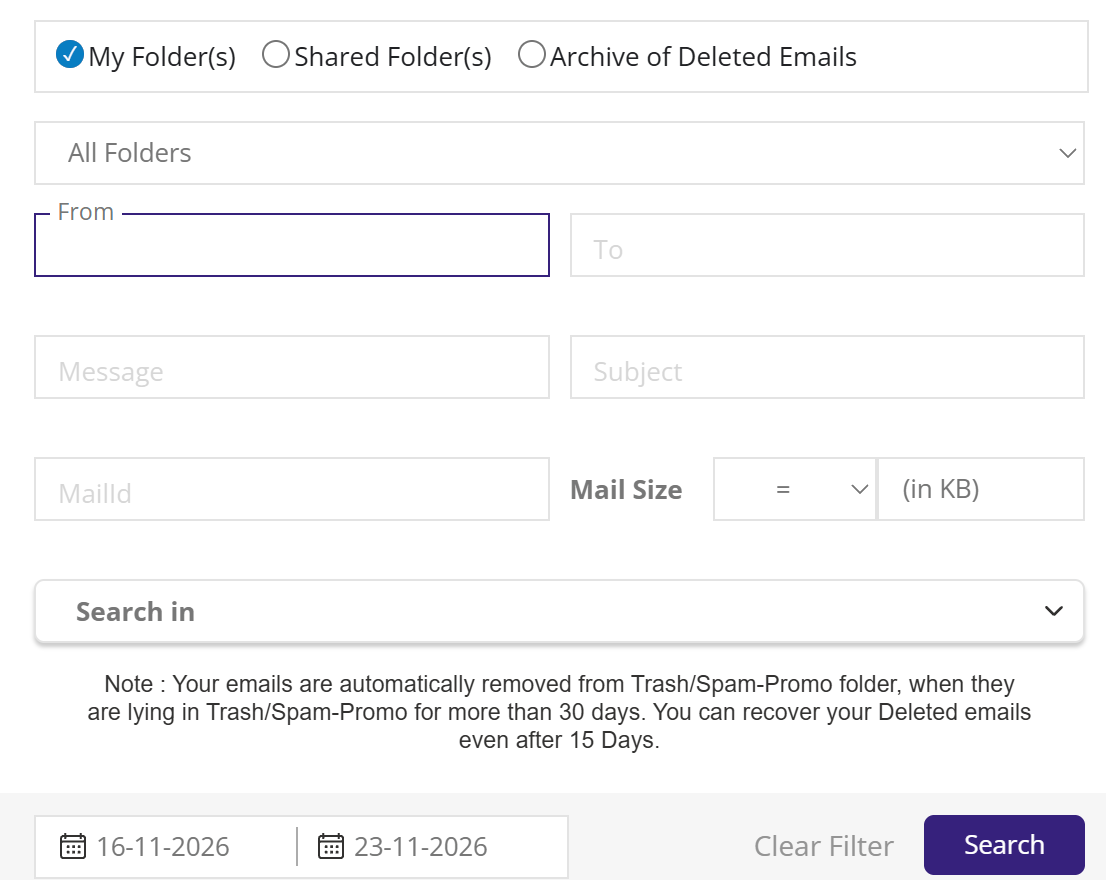
- Advanced Search filters by folder, From, To, Subject, message, size, read state, attachment name and type, and dates.
- Search inside attachments; set dates no more than 30 days apart.
- Narrow results, then move or delete every match at once.
- Search folders shared with you, and the Archive of Deleted Emails.
- Search in Hindi and other Indian languages.
XgenPlus Product Guide · 04 MailShare, delegate and mail groups
Mail is a team tool. XgenPlus lets colleagues help without sharing a password.
| Mail you receive | What XgenPlus shows |
|---|---|
| From outside your organisation | An External tag and a caution banner |
| From a sender using your name | A warning about a suspicious sender |
| From a trusted domain | A sender colour you can recognise |
| A newsletter | An Unsubscribe button next to the date |
| Held as suspicious | Quarantine Mail, to review and release |
XgenPlus Product Guide · 04 MailSpace, limits and getting mail back
Know your limits before you hit them. XgenPlus warns you early.
| Topic | Default or rule |
|---|---|
| Attachment files | Checked for viruses before they attach. Large files can be offered as a Storage link (Smart Attachment). |
| Mailbox space | A warning at 75% used and again when the mailbox is full. Check Storage Utilization on Home. |
| Deleted mail | Recoverable from Archive of Deleted Emails within your domain's retention period, 7 days by default. |
| Sending limits | Your administrator can limit recipients per mail and mails per day; an alert shows the limit. |
| Trash and Spam-Promo | Emptied automatically after 30 days. |
Connect other mail apps
- Outlook, Apple Mail, Thunderbird and phone mail apps connect with IMAP and SMTP.
- Turn IMAP on in Settings › Enable POP/IMAP and use an app password.
- The server names are the same for every customer.
Make it yours
- Four colour themes: Purple, Blue, Maroon and Green, plus dark mode.
- Larger default font up to 36 pt, and fewer mails per page.
- Right-click menus, mails in tabs, preview pane and full-screen reading.
XgenPlus Product Guide · 04 MailThe same mailbox everywhere
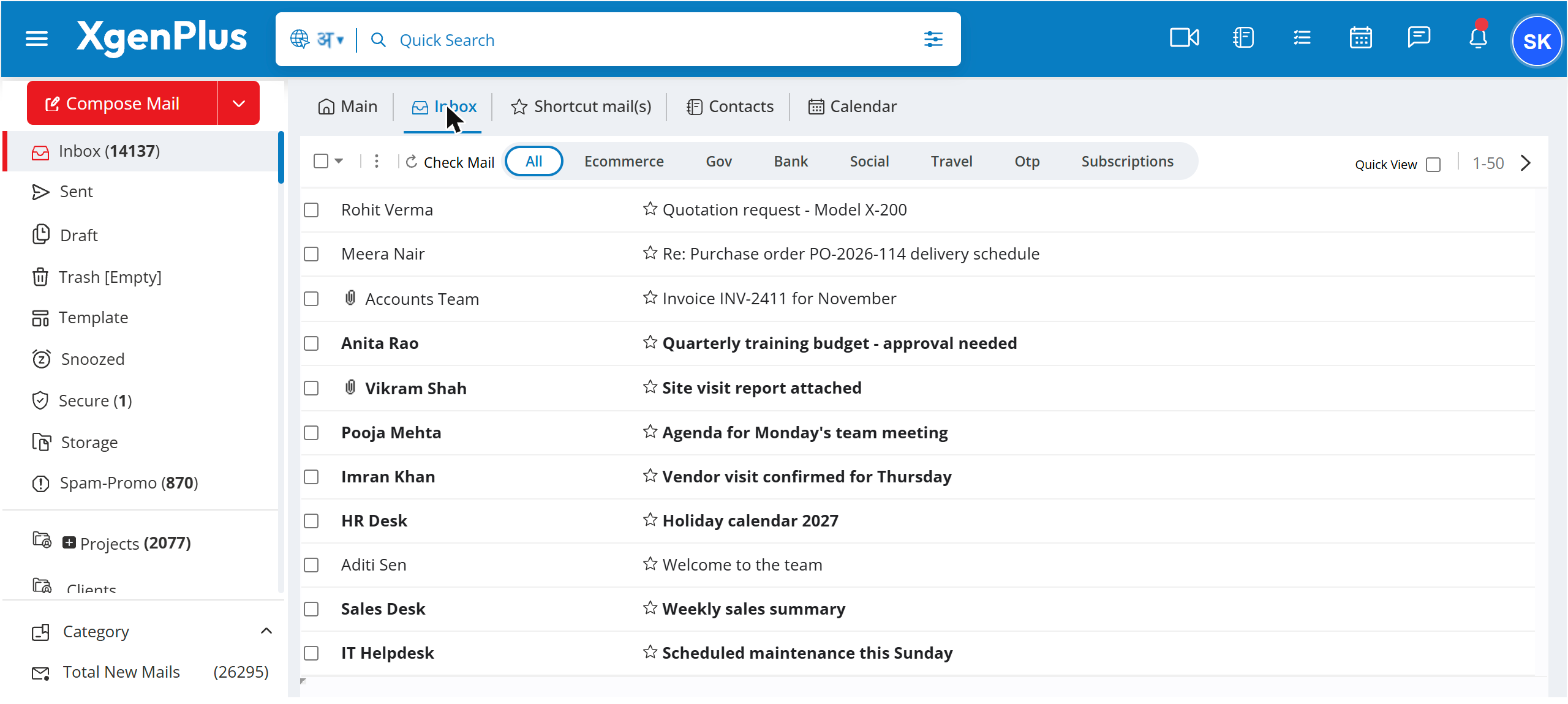
Webmail, the XgenPlus app, Windows apps and standard mail clients all see the same mail.
 XgenPlus Product Guide · 05 Siya and AI
Siya and AI features
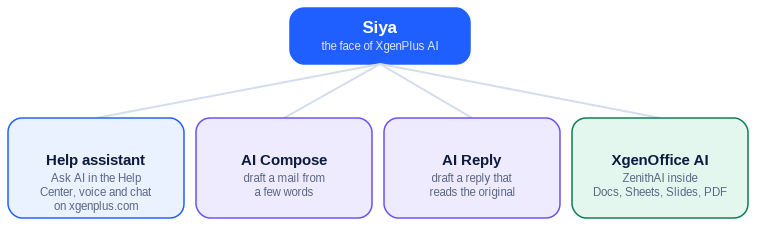
AI that helps you write, reply, summarise and ask, with you in control.
Where AI appears
- Mail: AI Compose and AI Reply (web, Android, iPhone for Compose).
- Documents: the AI tab in XgenOffice.
- Windows: the ZenithAI panel in XgenOffice for Windows.
- Assistants: your own AI tool through MCP.
You stay in charge
- Your domain admin can turn AI Compose and AI Reply on or off.
- Always read a draft and correct names, dates and figures.
- AI Compose takes up to 1,000 characters of instruction.
XgenPlus Product Guide · 05 Siya and AIAI Compose and AI Reply
From a few words to a finished draft, in eight to nine languages.
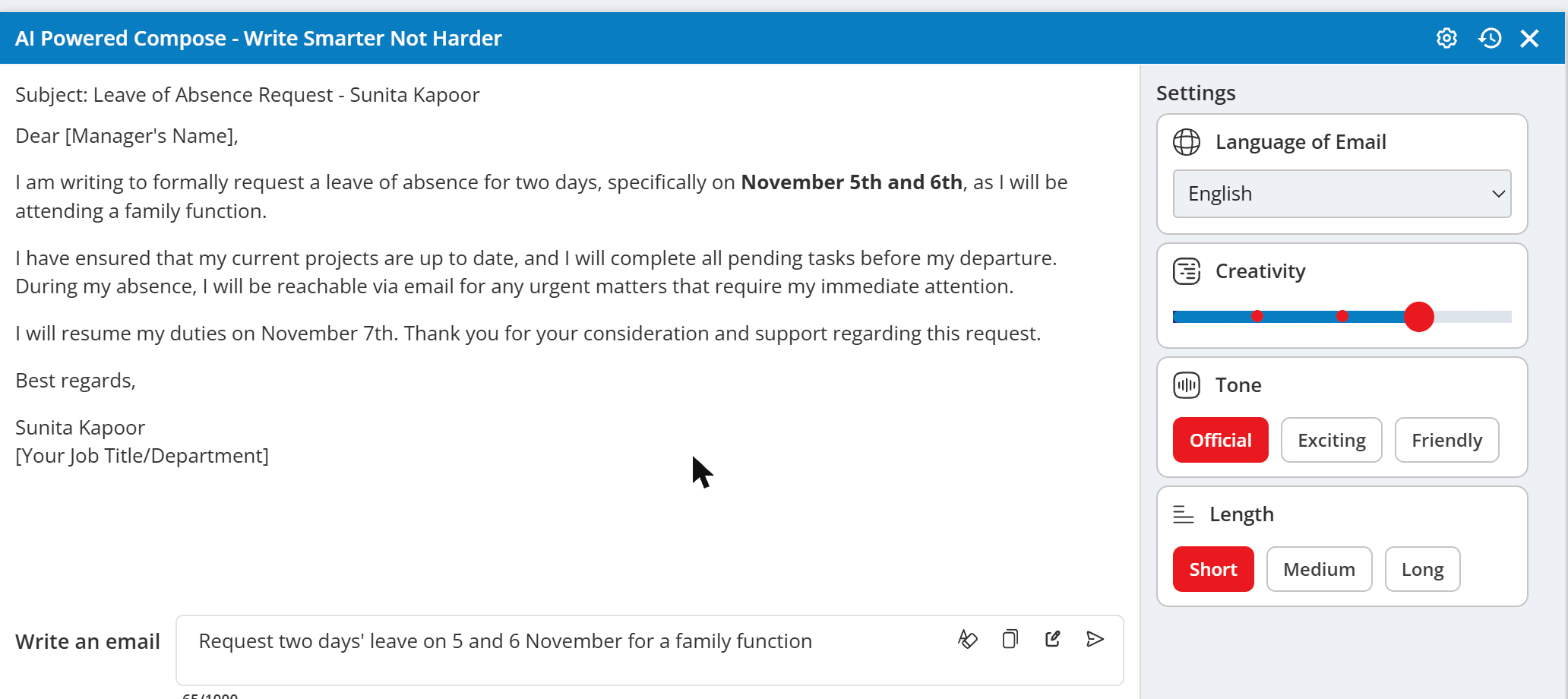
| Option | AI Compose | AI Reply |
|---|---|---|
| Where | Arrow beside Compose Mail | Ai reply icon in the reply window |
| Languages | English, Hindi, Assamese, Bangla, Gujarati, Kannada, Marathi, Punjabi | The same eight plus Telugu |
| Tone | Official, Exciting, Friendly | Official, Exciting, Friendly |
| Length | Short, Medium or Long (about 500, 1,000 or 2,000 words) | Short, Medium or Long |
| Extras | Creativity slider, history, Copy, Send to Compose | Auto reply, instruction box, Rewrite, Use this as Reply |
XgenPlus Product Guide · 05 Siya and AIXgenOffice AI and ZenithAI
AI inside Docs, Sheets, Slides and PDF, in the browser and on Windows.
| XgenOffice in the browser | XgenOffice for Windows (Beta) | |
|---|---|---|
| Open AI | The AI tab in the document | ZenithAI at the left of the ribbon |
| What it does | Chatbot, Summarization, Translation, Grammar & Spelling | Drafts, summaries and edits to your file; Roll back undoes changes |
| Setup | No setup while signed in. Included as a three-month trial, then needs the ZenithAI add-on. | Add your own AI key in Settings, then Test connection |
| Limits | Up to 30 AI requests a minute. | Beta: no support or warranty |
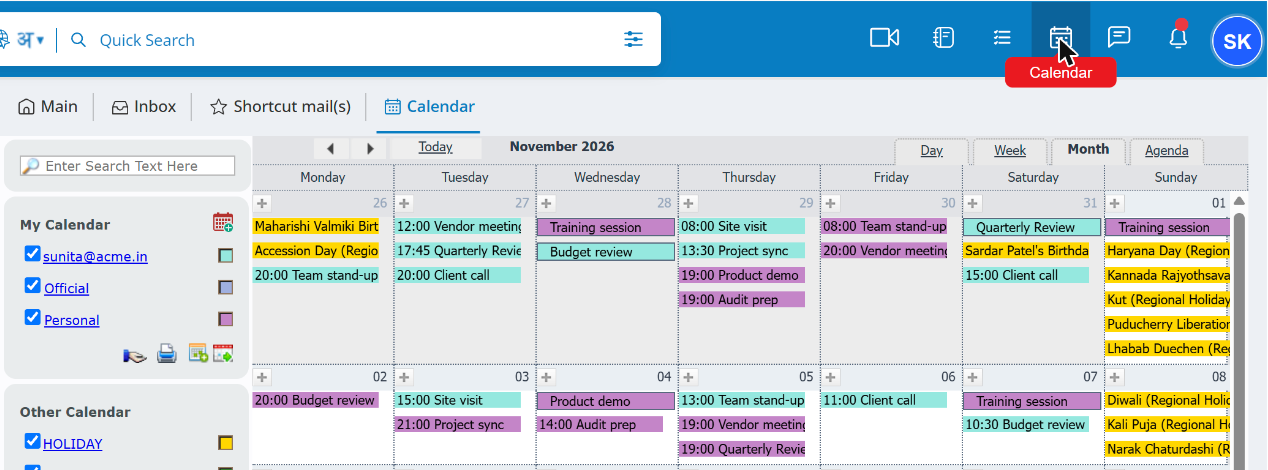
XgenPlus Product Guide · 06 Calendar, Contacts, TasksCalendar, Contacts and Tasks
Plan the meeting, book the room, find the person, track the to-do.
 XgenPlus Product Guide · 06 Calendar, Contacts, Tasks
Contacts, directory and tasks
Keep people one click away, and keep your own work in a private list.
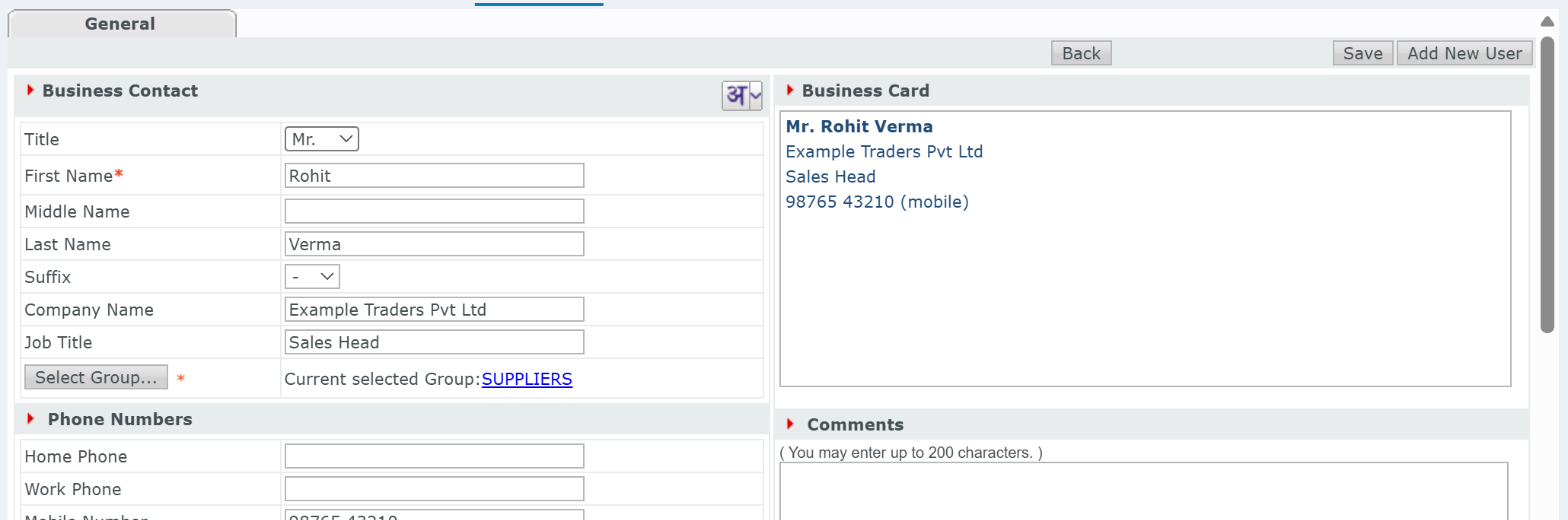
- Groups, several address books and groups you can share, read-only or editable.
- Group names can be up to 20 characters.
- Import and export CSV; send contacts as vCards.
- Check a group for dead addresses without sending mail.
- Ask contacts to update their own details.
- Store a contact's PGP public key.
Tasks and notes
- Open Tasks from the top bar. Your list is grouped into Overdue, Today, Tomorrow, Upcoming, No date and Completed.
- Add a task with Title, Notes, Due Date, Priority, Status and Tag.
- Status can be Open, In Progress, Completed or Cancelled.
- Tasks are private; only you can see them.
- Quick-add a task, then filter by tag or status.
- Attach notes to individual mails, and share them with colleagues who share the mail.
XgenPlus Product Guide · 07 Storage and Xgen OfficeStorage and Xgen Office
A file drive in your mailbox, with a real office suite for documents.
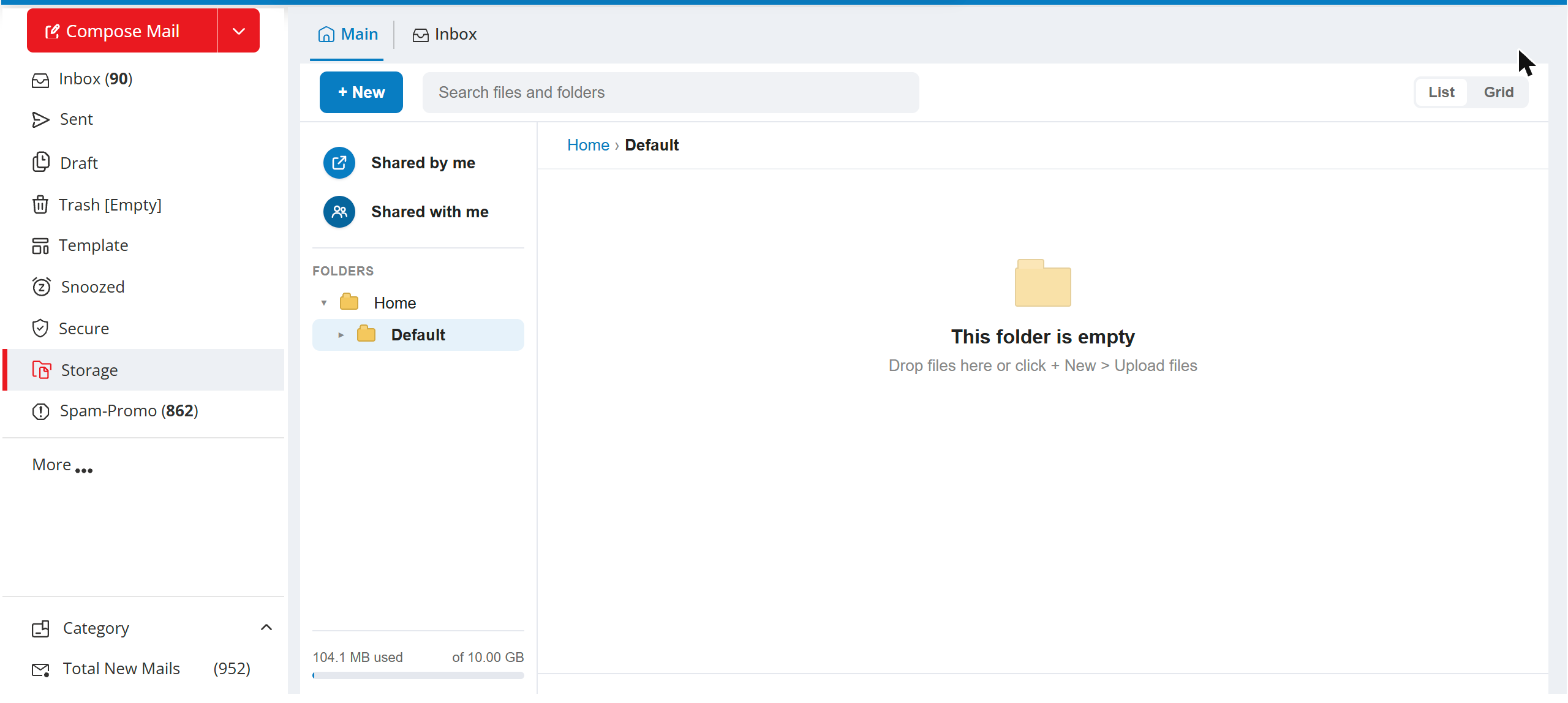
- Click Storage in your folder list. Home is your first folder, with Shared by me and Shared with me above it.
- Switch between List and Grid.
- Upload files, create folders, rename, move, download and delete.
- Preview many file types without downloading.
- Search by name or file type.
- Save mail attachments to Storage in one click.
XgenPlus Product Guide · 07 Storage and Xgen OfficeEdit Word, Excel and PowerPoint together
XgenOffice is the document editor built into Storage. No download, no separate login.
| Step | What to do |
|---|---|
| 1 | Open Storage and right-click a file, or open the document |
| 2 | Choose Share and type email addresses |
| 3 | Pick Viewer, Commenter or Editor |
| 4 | Under General access choose Restricted, your domain, or Anyone with the link |
| 5 | Click Send; everyone who opens it works in one live session |
XgenPlus Product Guide · 07 Storage and Xgen OfficeYour office suite on your PC (Beta)
A desktop app for Word, Excel, PowerPoint and PDF files, with a built-in ZenithAI assistant.
Install in five steps
- Open xgenplus.com/download.html and click Download Xgen Office (Beta).
- Run the installer.
- Open XgenOffice, go to Settings › Account and enter your XgenPlus address.
- In the XgenPlus app choose Web Login, then TOTP.
- Type the code in WebLogin code and click Sign in.
Good to know
- Files are saved on your PC in Microsoft formats.
- AI uses an API key you add yourself in Settings.
- Sheets opens .xls and .csv files as copies; save as .xlsx.
- Sign out from Settings › Account.
XgenPlus Product Guide · 08 Meet, Chat, teamworkMeet, Chat and teamwork
Talk, meet and share work without leaving your mailbox.
A meeting from start to finish
- Create an event in Calendar and invite people (Chapter 6).
- Add a VideoMeet link, or use New Meeting to start now.
- Share your screen when you need to show something. Allow the camera and microphone when your browser asks.
- Record decisions with Add Minutes of Meeting and mail them to attendees.
XgenPlus Product Guide · 08 Meet, Chat, teamworkXgenAir Assignments
Turn a shared mailbox such as support@ into a managed queue with owners, notes and reports.
What agents see
- An Assignments queue in the profile menu.
- A suggested reply they can edit.
- Conversation history and internal notes.
What the supervisor sees
- Every assigned conversation.
- Reassignment between agents.
- Reports by date, agent or group.
XgenPlus Product Guide · 08 Meet, Chat, teamworkAttendance and field work in the app
The XgenPlus mobile app can record attendance and manage sales leads for teams on the move.
| Task | In the XgenPlus app |
|---|---|
| Mark attendance | Attendance, then a face check |
| Remarks for time out of office | Add remarks to explain a gap |
| Add a sales lead | Lead Management dashboard › Add Lead |
| See your leads | Dashboard, with find and filter |
XgenPlus Product Guide · 09 Forms and Plus PacksForms and Plus Packs
Collect answers with Forms. Add power to your domain with Plus Packs.
| Free Forms | Forms Plus | |
|---|---|---|
| Forms a month | 5 | 100 |
| Responses a month | 100 | 2,000 |
| Who can answer | Only people with an XgenPlus address | Anyone with the link, without signing in |
| Answers kept | 30 days after the form closes | While Forms Plus is active |
XgenPlus Product Guide · 09 Forms and Plus PacksPlus Packs
Domain admins add these from the dashboard, under Plus Packs (Add-ons). They are priced per user or per size; see the pricing page for current prices.
| Forms Plus | Mail Rescue | Storage Boost | |
|---|---|---|---|
| Applies to | Your team's Forms | Every mailbox on the domain | The domain's shared storage |
| Where to buy | Dashboard › Plus Packs | Dashboard › Plus Packs | Dashboard › Plus Packs |
| Who buys | Domain admin | Domain admin | Domain admin |
| Not for | Trial domains | Trial domains | Trial, unlimited-storage and Platinum domains |
XgenPlus Product Guide · 10 Security and complianceSecurity and compliance
Layers of protection, from the mail itself to how your domain is governed.
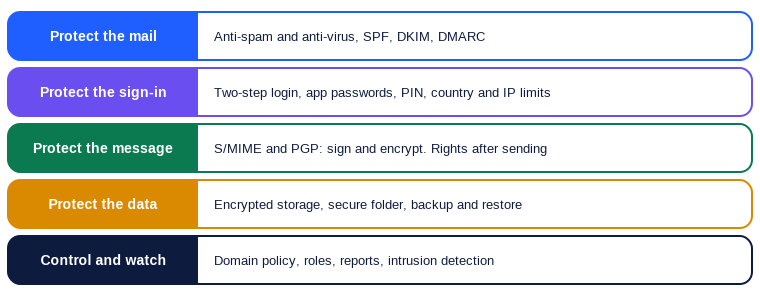 XgenPlus Product Guide · 10 Security and compliance
Who can sign in, and from where
Each user can lock their own account down. Admins can add domain-wide rules.
| Control | What it does | Where |
|---|---|---|
| Two-step login | After your password, a one-time code goes to your alternate email. | Settings › Security |
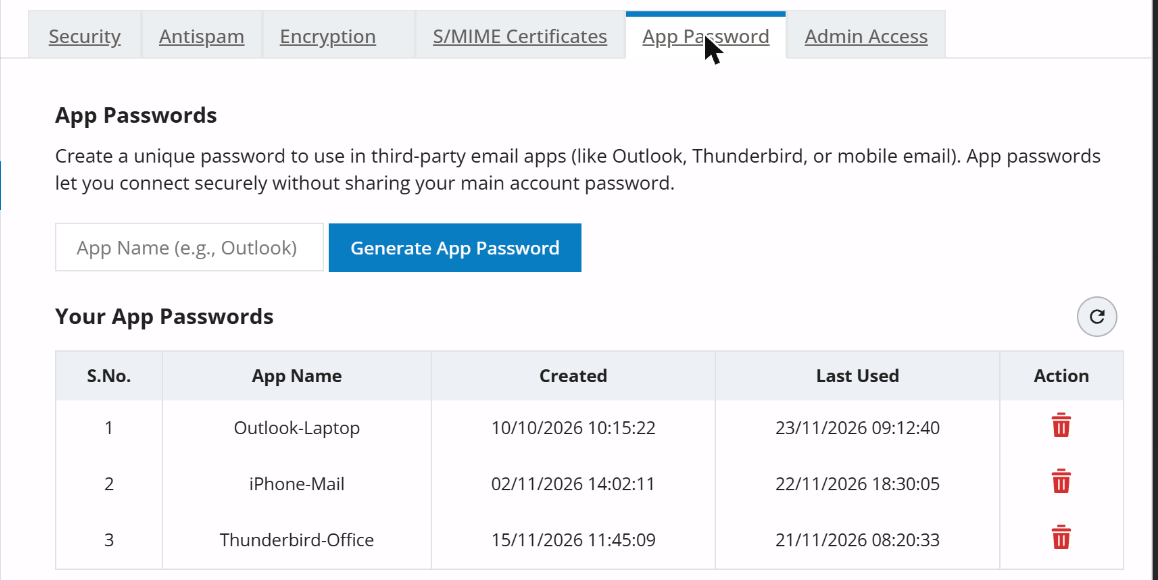
| App password | A separate password for one mail app; up to 10 active | Security › App Password |
| Sign in with a PIN | A short PIN on a browser you trust, after two-step login | Offered after sign-in |
| Code from the app | Sign in without typing your password | Login page › Secure Login Via APP |
| Allowed countries | Refuse sign-ins from other countries | Settings › Security |
| Home or office IP | Refuse sign-ins from other internet addresses | Settings › Security |
| Multiple sign-ins | Allow or block the same account signed in more than once | Settings |
| Recent sign-ins | Last 10 login IPs; open sessions shown in red | Home › Security Checks |
| Failed sign-in alerts | A phone alert names the browser and IP | XgenPlus app |
| Secure folder | Sensitive mail behind a second password | Folder list › Secure |
For admins
- Sign users in with AD, LDAP or an HTTP API.
- Restrict a user to approved devices.
- Wipe mail from a lost phone with Enable Wipe.
- Set password rules and allowed IP ranges (up to 10).
- Block repeated failed logins and spam.
XgenPlus Product Guide · 10 Security and complianceS/MIME and your own certificate authority
Each domain gets its own certificate authority. Users get certificates at no extra cost.
| Role | Step |
|---|---|
| Admin | Manage Domain(s) › your domain › S/MIME / PKI › CA Operations › Create Authority |
| User | Settings › Security › S/MIME Certificates › Generate Certificate |
| User | Compose › shield icon › Encrypt for recipients, or sign |
| Recipient | Open the mail › Verify Signature |
XgenPlus Product Guide · 10 Security and compliancePGP, rights and data protection
Choose the protection that fits each message and each domain.
| Choose | When |
|---|---|
| S/MIME | Standard sign-and-encrypt for your organisation with its own CA |
| PGP | You exchange keys with partners who use PGP |
| Rights | A mail should stay inside the organisation and not be forwarded or printed |
| Hidden attachments | A file needs a password before it can be revealed |
XgenPlus Product Guide · 10 Security and complianceRegulated sectors and native-script addresses
Built to be used under strict policies, and in the scripts people actually write.
For regulated organisations
- Controls for data residency, encryption, identity and access, threat defence, data loss prevention and audit.
- Four deployment models: hosted, private cloud, on-premise and hybrid, with the same security design.
- Mapped to RBI, CERT-In and DPDP expectations on the site's banking page.
- A checklist for RBI-aligned email is available there.
Honest framing
XgenPlus provides technical controls. It does not issue a compliance certificate. Retention, archival and legal hold arrangements are agreed with the XgenPlus team for your needs.
| Topic | Where to read more |
|---|---|
| Banking and RBI alignment | xgenplus.com/bfsi-email-security.html |
| Native-script (IDN/EAI) addresses | xgenplus.com/idn-email.html |
| Security platform | xgenplus.com/security.html |
| Security terms | docs.xgenplus.com/security/email-security-glossary/ |
XgenPlus Product Guide · 11 Admin and domainsAdmin and domain management
Run your domain from one console: people, policy, limits, backup and reports.
Admin roles
| Role | What it can do |
|---|---|
| Domain Administrator | Runs the whole domain |
| Billing Administrator | Sees reports and the Service Report |
| Support Administrator | Manages users only |
| Group Administrator | Manages groups only |
| Assignment User | Supervises an XgenAir shared inbox |
Your first day
- Open the console and check your domain details.
- Review the Option tab.
- Add users one by one or in bulk.
- Create groups.
- Set your Policy.
- Post an Alert or Notice to tell people what is new.
XgenPlus Product Guide · 11 Admin and domainsUsers, limits and policies
Add people in bulk, set sensible defaults, and switch services on or off for the whole domain.
Services you can switch on or off for the domain
| Service | What it covers |
|---|---|
| SMTP-IN, SMTP-OUT | Receiving and sending mail |
| POP, IMAP | Mail programs that connect |
| HTTP | Webmail in the browser |
| CHAT, VIDEOMEET | Chat and video meetings |
| ANTI-VIRUS | Virus scanning of mail |
| OFFICE | Creating and editing files in Storage with XgenOffice |
AI settings: AI Compose, AI Reply and Generate Auto Reply can each be switched on or off for the domain.
XgenPlus Product Guide · 11 Admin and domainsBackup, reports, server admin and APIs
Keep control of data and operations, and connect XgenPlus to your other systems.
| API | What it does | Who uses it |
|---|---|---|
| Domain Provisioning API | A JSON REST API: check if a domain is free, create it with its admin, update limits and expiry, and delete it. Scoped bearer token, idempotency keys, audit-logged. | Partners and server administrators |
| User Provisioning API | Create, update, list and delete mailboxes from another system such as an HRMS or billing platform. Your administrator issues an API key and allows the calling server's IP address. | IT and HR systems |
XgenPlus Product Guide · 12 AppsMobile and desktop apps
Your mailbox on your phone, your PC and any mail app you already use.
| Where | Get it |
|---|---|
| Android | XgenPlus on Google Play |
| iPhone and iPad | Xgen Email on the App Store |
| Domain admins (Android) | XGen Admin |
| All downloads | xgenplus.com/download.html |
XgenPlus Product Guide · 12 AppsWindows apps and standard mail clients
Use XgenPlus's own apps, or connect the mail program you already trust.
Connect Outlook, Apple Mail, Thunderbird and phone mail apps
| Setting | Incoming (IMAP) |
|---|---|
| Server | imaps.xgenplus.com |
| Port | 993, SSL/TLS |
| User name | Your full email address |
| Password | An app password |
| Setting | Outgoing (SMTP) |
|---|---|
| Server | smtps.xgenplus.com |
| Port | 465 SSL/TLS, or 587 STARTTLS |
| Sign-in | Required, same user name |
| Password | An app password |
- Turn on IMAP in Settings › Enable POP/IMAP and choose a start date.
- Create an app password in Settings › Security › App Password.
- Add the account in your mail app using manual set-up and the settings above.
- Choose IMAP, not Exchange or Microsoft 365.
XgenPlus Product Guide · 13 AI agents and APIsAI agents and developer APIs
Let your own AI assistant work with your mailbox, safely and under your permissions.
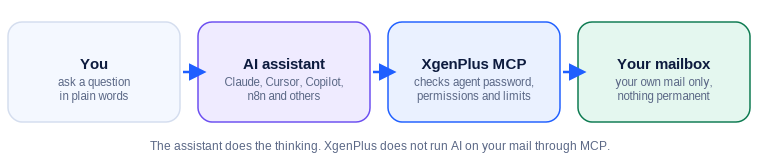
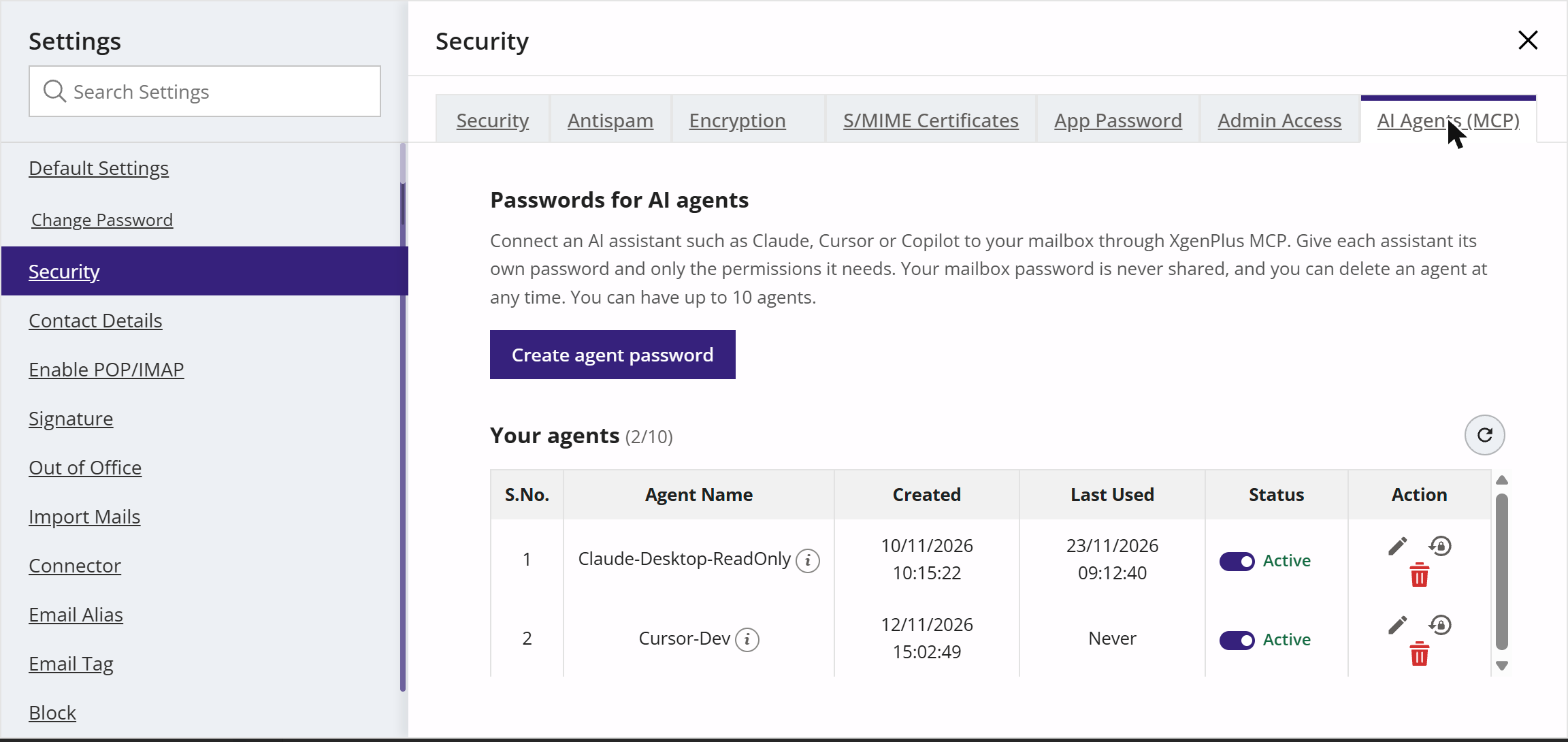
XgenPlus Mail works with AI assistants through MCP (Model Context Protocol). The assistant gets safe, permission-checked tools for your own mailbox only, signing in with a separate agent password.
| Server detail | |
|---|---|
| Address | https://mcp.xgenplus.com/mcp |
| Sign-in | Authorization: Bearer token |
| OAuth | Not supported yet |
| Who can use it | User and domain admin accounts on a paid plan |
XgenPlus Product Guide · 13 AI agents and APIs53 tools, and permissions you choose
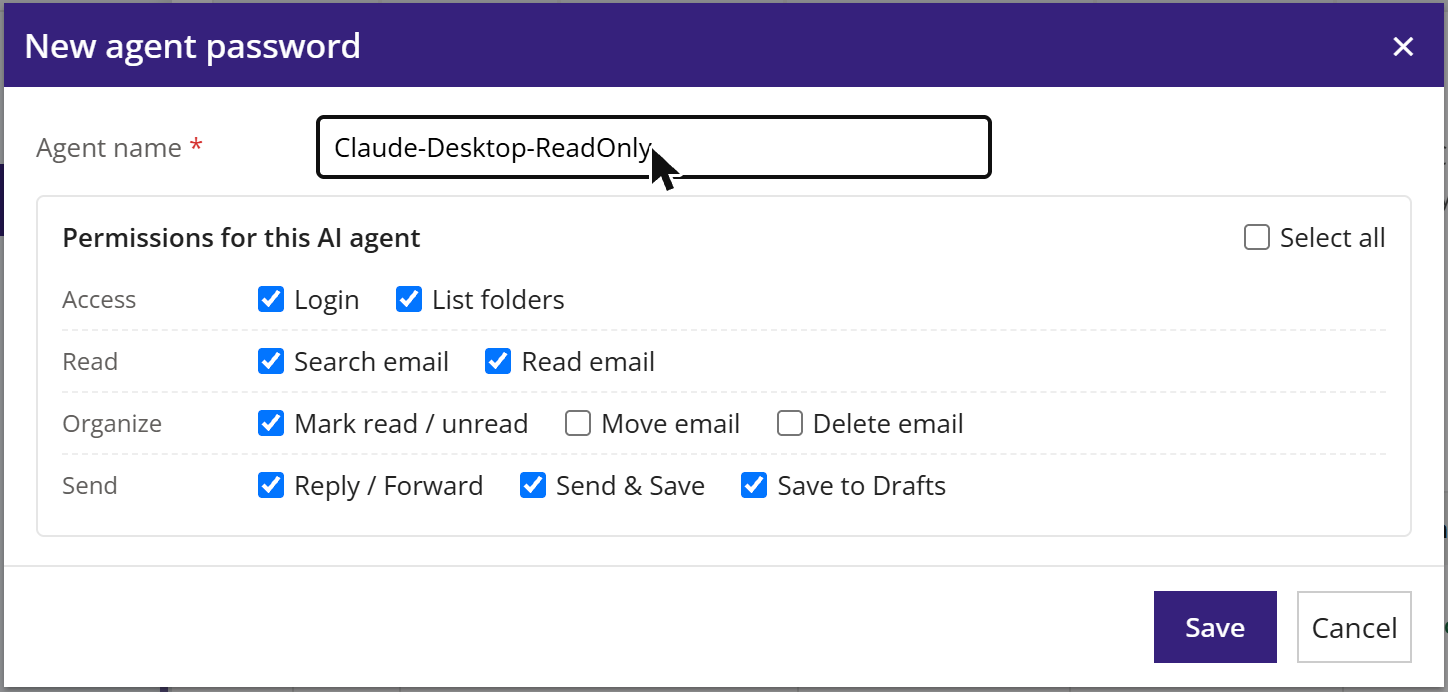
Each agent password has its own on and off permissions. Start read-only.
| Permission group | Permissions you can tick |
|---|---|
| Access | Login, List folders |
| Read | Search email, Read email |
| Organize | Mark read / unread, Move email, Delete email |
| Send | Reply / Forward, Send & Save, Save to Drafts |
Works with Claude Code, Claude Desktop (through a bridge), Cursor, VS Code with GitHub Copilot, OpenCode, n8n and your own code. ChatGPT and claude.ai connectors are not supported yet because they need OAuth sign-in.
XgenPlus Product Guide · 13 AI agents and APIsBuilt so an assistant cannot do harm
Permissions, held sends, a signed header and clear limits.
Limits to know
- Up to 10 agents per mailbox, sharing the mailbox's limits.
- 120 tool calls a minute and 20 emails sent an hour.
- Included on every plan at no extra charge, with no charge per call.
Privacy
- XgenPlus does not send your mail to any AI provider and does not run AI on it through MCP.
- Mail the assistant reads goes to that assistant's provider, under its terms.
- Your AI app's own subscription is separate.
| You see | Meaning |
|---|---|
| SCOPE_REQUIRED | A permission is off. Turn it on in webmail. |
| RATE_LIMITED | Too many requests. The message says when to retry. |
| A held send | It is waiting in Drafts for you to review. |
XgenPlus Product Guide · 14 Plans and billingPlans and billing
Pay per user, mix plans on one domain, and grow when you need to.
| Plan | Storage per user | Attachment size | How to buy |
|---|---|---|---|
| XGEN Starter | 2 GB | 10 MB | Online |
| XGEN Starter Pro | 5 GB | 20 MB | Online |
| XGEN Premium | 10 GB | 25 MB | Online |
| XGEN Advance | 30 GB | 50 MB | Online |
| XGEN Advance Pro | 50 GB | 100 MB | Online |
| XGEN Enterprise | 100 GB | 100 MB | Online |
| XGEN Enterprise Pro | See pricing page | See pricing page | With the sales team |
| XGEN Platinum | Custom | Custom | Custom |
| XGEN Trial | One month, up to 5 users | Online, cannot be mixed |
XgenPlus Product Guide · 14 Plans and billingFrom first order to renewal
The dashboard on xgenplus.com is where domain admins buy, verify, add users and renew.
| Dashboard tab | What it is for |
|---|---|
| Domains | Status, users, storage, renewal dates, with Manage, Renew Now and Pay Invoice |
| DNS & Verification | Ownership proof, mail records and setup progress |
| Users | Users bought, quotas, expiry, and Buy more users |
| Subscriptions | Every order with plans, users and any multi-year discount |
| Plus Packs (Add-ons) | Mail Rescue, Storage Boost and Forms Plus |
| Billing | Invoices to download and payment history |
XgenPlus Product Guide · 14 Plans and billingTrial, refunds and the Partner Program
Clear rules, written down.
Trial
- XGEN Trial gives up to 5 mailboxes for one month. It does not renew and cannot be mixed with other plans.
- It is a paid trial at a very low price per user.
- Free Forms and Plus Packs are not included.
- Upgrade to a paid plan from the dashboard when ready.
Refunds and cancelling
- Ask for a full refund of your first annual payment within 15 days by writing to support@xgenplus.com.
- After that, annual fees, renewals and mid-term additions are generally not refundable.
- Cancelling stops future renewals but does not refund the paid term.
- Plans are billed annually.
| Question | Answer |
|---|---|
| Is XgenPlus free? | No. Plans are paid. XGEN Trial lets you try it first. |
| Can teams be on different plans? | Yes, on one domain with one bill. |
| Is MCP included? | Yes, on every plan, with usage limits. |
| Do I name mailboxes while buying? | Only the administrator login. Create the rest in the admin console. |
XgenPlus Product Guide · 15 Support and glossarySupport, glossary and index
Where to get help, what to do first, and what the terms mean.
Your first day as a domain admin
- Open the console from webmail and check your domain details.
- Review the Option tab.
- Add users one by one or in bulk.
- Create groups.
- Set your Policy.
- Post an Alert or Notice.
Find it fast
| I want to… | Go to |
|---|---|
| Set up Outlook or my phone | Chapter 12 and the Desktop & Mobile Setup Guide |
| Take back a mail | Chapter 4: Undo Send and Recall |
| Encrypt a mail | Chapter 10: S/MIME and PGP |
| Connect an AI assistant | Chapter 13 |
| Understand plans and billing | Chapter 14 |
| Make a form | Chapter 9 |
XgenPlus Product Guide · 15 Support and glossaryTerms in plain language
The words you will meet when you set up and secure XgenPlus.
| Term | Meaning |
|---|---|
| SPF, DKIM, DMARC | DNS records that help receiving servers check that mail claiming to be from your domain really is. |
| MX record | A DNS record that tells the internet where to deliver mail for your domain. |
| S/MIME and PGP | Two ways to sign and encrypt individual mails. S/MIME uses certificates from your domain's certificate authority; PGP uses keys you create. |
| Two-step login | A code after your password, sent to your alternate email. |
| App password | A separate password for one mail app. Up to 10 active. |
| Agent password | A separate password for one AI assistant under MCP, with its own permissions. |
| IMAP, POP, SMTP | Protocols mail apps use to read and send mail. IMAP keeps devices in step. |
| MCP | Model Context Protocol: the standard that lets AI assistants use tools such as your mailbox. |
| XgenAir | Assignments: a shared inbox managed by agents. |
| ZenithAI | The AI engine inside XgenOffice. |
| Plus Packs | Add-ons for a domain: Forms Plus, Mail Rescue and Storage Boost. |
| SpamJadoo | The anti-spam service that works with XgenPlus. |
| Quarantine | A holding folder for suspicious mail you can review and release. |
| Rights | What recipients may do with a mail: reply, forward, print or delete. |
Help is one click away