The right
role for
every job.
Who sees what and who can do what in the XgenPlus admin console, with patterns for real organisations.

 XgenPlus Role-Based Administration Guide · Contents
What is inside
Seven roles, one rule: the smallest role that does the job. Learn each role, then use the table and the patterns to design your own set-up.
In this guide
01Why rolesLeast privilege, in plain words302The roles, one by oneWho sees what, who can do what403Giving and taking rolesAssign, review, hand over804Who can do whatOne table for every task1005Designing your set-upPatterns for four kinds of organisation1106Keep it healthyReviews, rules of thumb, questions13Always up to date. The latest and most up-to-date information is always available at docs.xgenplus.com.
 XgenPlus Role-Based Administration Guide · 1 Why roles
Why roles
Nobody should be able to do more than their job needs. Roles are how XgenPlus makes that easy.
The idea
An administrator role defines what a person can see and manage. Instead of sharing one all-powerful login, you give each person the role that fits their job. A helpdesk agent resets passwords. Finance reads reports. A team lead runs their own group. Only a few people run the whole domain.
The result is less risk, a clearer trail, and people who are not afraid to touch the console because they can only reach what is theirs.
The roles at a glance
- The whole server
- Creates domains
- Set by the XgenPlus server owner
- One whole domain
- People, settings, policy
- Hands out the other roles
- Users only
- Edits plain user accounts
- No other admins
- Reports and Service Report
- Read-only Edit Domain
- Signs in with Report
- Manage Groups only
- Internal and public groups
- Not Share Group
- An XgenAir shared inbox
- Routes and supervises
- Appears when XgenAir is on
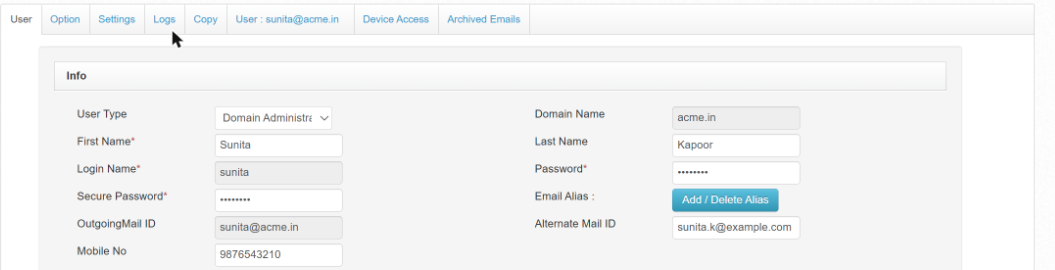
- Open the person's mailbox (Add User, or Manage Users › login name).
- Choose the User Type and save. There is no separate page for creating admins.
- Only Domain and Server administrators can hand out roles. A Support Admin sees only the plain User type in the list.
- Assignment User appears in the list only when XgenAir is switched on for your domain.
XgenPlus Role-Based Administration Guide · 2 The roles, one by oneThe roles, one by one
For each role: what the menu shows, what it can do, what it cannot, and when to use it.
- Backup & Archival
- Reports: Domain Statistics, Graphical Report, Intrusion Detection
- Manage Domain(s): users, groups, bulk, policy, themes, mailing lists, S/MIME, resources, templates
- Edit Domain (the pencil)
- Add, edit, delete and restore users
- Hand out roles
- Set policy, services, limits, security
- Back up, restore, clean up mail
- Announce with Shout Box
- Change the number of users or total storage (set by your purchase)
- Change the domain's expiry or retention
- Delete a server administrator
- Create server administrators
- Open the person's mailbox and set User Type to Domain Administrator.
- Ask them to open Admin from their profile menu and enter the login code.
- Keep two Domain Administrators, not one.
- A Domain Administrator can also be given access to other domains by those domains' admins.
XgenPlus Role-Based Administration Guide · 2 The roles, one by one- Manage Users
- Service Report
- A user's User and Archived Emails tabs
- Find users and edit their basic details
- Reset a user's password
- Restore a deleted user
- Read the Service Report
- Open other administrators (they see "not allowed to view the administrator details")
- See Option, Settings, Logs, Copy and Device Access tabs
- Add users, delete users, set policy or open Edit Domain
- Open the person's mailbox and set User Type to Support Administrator.
- A Support Admin can only create and see the plain User type.
- Roles are not split by branch or department: a Support Admin can manage every plain user in the domain.
- Report in the profile menu (instead of Admin)
- Reports › Reports (statistics)
- Service Report
- Edit Domain opened read-only
- Run statistics: New User Created, User Expired, number of mails, aliases, tracking
- Print or download the result
- Read the Service Report
- Save changes in Edit Domain or its Option tab
- See Policy, Alert/Notice, Domain Statistics, Graphical Report or Intrusion Detection
- Run New Domain Created and Domain Expired
- Open the person's mailbox and set User Type to Billing Administrator.
- Tell them to open Report from the profile menu.
- The reports cover your own domain only.
- Email addresses typed into the report must belong to your domain.
XgenPlus Role-Based Administration Guide · 2 The roles, one by one- Manage Groups: internal and public groups
- Service Report
- Add, edit and delete groups
- Change group settings
- Send mail and notifications to a group
- Share a group (Share Group)
- See users, policy, reports or settings
- Use the search box in the console
- Open the person's mailbox and set User Type to Group Administrator.
- A group with no members cannot be mailed or notified.
- Name rule: up to 70 characters, starts with a letter, no spaces.
- Assignments in the profile menu
- All conversations across the agent groups
- The Reports tab next to Assignments
- Create routing rules and agent groups
- Assign conversations to agents or groups
- Add notes and tags, reply and close
- Check agent performance
- Administer the domain: that stays with Domain Administrators
- Switch on XgenAir in the domain options (Enable Assignment Module) and save.
- Create the shared mailbox (for example support@) with User Type Assignment User.
- The option appears in User Type only when XgenAir is on.
- See the XgenAir guide for the full set-up.
XgenPlus Role-Based Administration Guide · 2 The roles, one by one- Manage Server: domains, gateways, services, themes, server settings
- All reports, including IP statistics and anti-virus reports
- Create and delete domains
- Set each domain's users, total storage, expiry and retention
- Create other administrators for any domain
- (Nothing in the console is out of reach)
- Server Administrators are set up by the owner of the XgenPlus server.
- A Domain Administrator cannot open a server administrator's record or delete them.
- The user count and total storage you see on Edit Domain come from this role and from your online purchase.
User
Assignment User- Their own webmail only
- Read and send mail, use calendar, files, meetings and AI features
- Open the admin console
- Choose User in User Type (the default for a new mailbox).
- Set a person back to User when they no longer need an admin role.
XgenPlus Role-Based Administration Guide · 3 Giving and taking rolesGiving and taking roles
Four small procedures. Do them carefully and your set-up stays clean.
- Open Manage Users and search the person (or Add User for a new mailbox).
- Change User Type to the role they need.
- Click View / Save Changes, check the values, then Save.
- Their menus follow the new role.
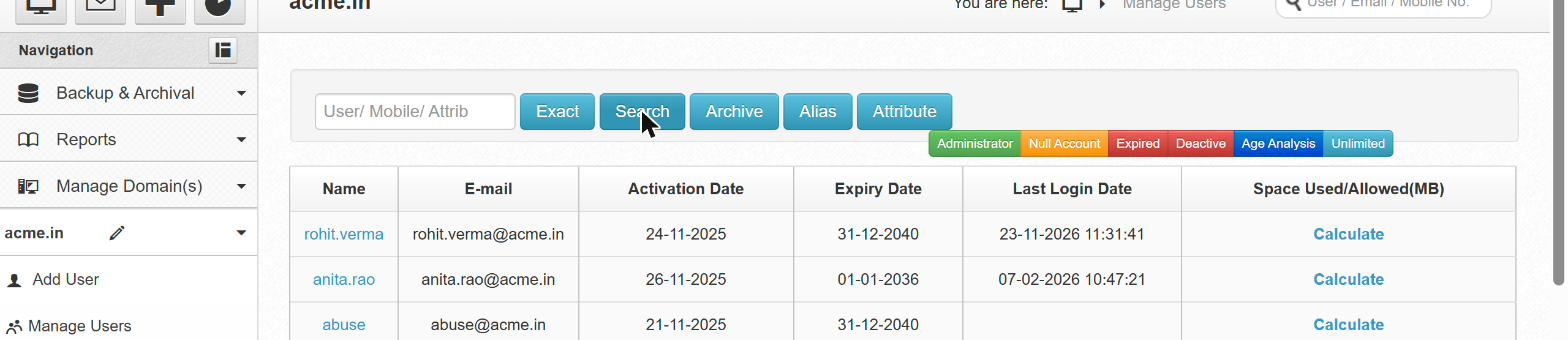
Review who has admin roles
Domain Admin- Open Manage Users and click the Administrator quick button.
- Read the list: does everyone still need their role?
- Set anyone who does not back to User.
- The list also has quick buttons for Expired and Deactive accounts.
 XgenPlus Role-Based Administration Guide · 3 Giving and taking roles
- Click Add Domain Admin and enter their email address.
- Click Send Verification Code: the code goes to them.
- Ask them for the code, type it and click Verify.
- Up to 10 other-domain admins, who must be domain administrators of another domain on the same server.
- They switch to your domain by typing its name in the search box at the top of their console.
Hand over when someone leaves
Domain Admin- Set their User Type back to User on their last day, or before if you are worried.
- Give the role to the successor.
- If they are leaving the company, back up the mailbox, then delete the user (it is a soft delete you can restore).
- Delete is a soft delete. You can restore from Manage Users › Archive.
XgenPlus Role-Based Administration Guide · 4 Who can do whatWho can do what
The whole guide in one table. ● allowed, – not available.
| Task | Server | Domain | Support | Billing | Group | Assign-ment |
|---|---|---|---|---|---|---|
| Open the admin console (Admin / Report) | ● | ● | ● | ● (Report) | ● | – |
| Add users | ● | ● | – | – | – | – |
| Edit users | ● | ● | ● plain users | – | – | – |
| Delete users | ● | ● | – | – | – | – |
| Restore a deleted user | ● | ● | ● | – | – | – |
| Hand out roles | ● | ● | – | – | – | – |
| Manage groups | ● | ● | – | – | ● | – |
| Bulk Add and Bulk Update | ● | ● | – | – | – | – |
| Edit Domain | ● | ● | – | read only | – | – |
| Policy, Alert/Notice, Shout Box, Add Themes | ● | ● | – | – | – | – |
| S/MIME, Backup & Archival, Domain Cleaner | ● | ● | – | – | – | – |
| Service Report | ● | ● | ● | ● | ● | – |
| Domain Statistics, Graphical, Intrusion Detection | ● | ● | – | – | – | – |
| Reports › Reports (statistics) | ● | – | – | ● | – | – |
| XgenAir: routing, supervise, agent reports | – | – | – | – | – | ● |
| Create domains, set users, storage and retention | ● | – | – | – | – | – |
The table follows the menus each role sees in the console. A menu you cannot see is not available to your role. The latest information is always at docs.xgenplus.com.
XgenPlus Role-Based Administration Guide · 5 Designing your set-upDesigning your set-up
Four patterns. Take the closest one and adjust it.
A small office of 10 to 30 people
Two admins, no more- Two Domain Administrators: you and a trusted deputy.
- No Support Admin yet: you two handle passwords.
- Finance: ask for reports, or give one person Billing once the numbers matter.
- Add a Shout Box and a welcome mail so people know who to ask.
A school or college
Teachers run their own classes- One or two Domain Administrators in IT.
- Support Administrators in the lab, for student and staff password resets.
- Group Administrators: one per class teacher, running a dynamic group by class attribute.
- A Billing role for the accounts office.
A support desk or BPO
Dispatcher plus agents- A Domain Administrator turns on XgenAir.
- The support head owns the shared inbox as Assignment User.
- Agents stay plain Users; they find Assignments in their profile menu.
- A Support Administrator handles agent passwords.
XgenPlus Role-Based Administration Guide · 5 Designing your set-upA multi-branch company
Central control, local help- Two central Domain Administrators own policy and security.
- A Support Administrator at each branch for local password resets.
- Branch attributes and dynamic groups give each branch its own mailing groups.
- Remember: Support Admins are not limited to their branch. Rely on trust and review, not on a wall.
Separate duties for an audit
Same people, fewer risks- Give Billing to finance, so they never need Domain Admin to read numbers.
- Keep Domain Administrator to two or three named people.
- Review the Administrator list every quarter and keep a note.
- Take screenshots of Edit Domain › Info and Policy for the auditor.
- One person, one login: never share an admin account.
- Smallest role that does the job.
- Two Domain Administrators, never one.
- Remove a role the day a person stops needing it.
- They do not limit by branch or department.
- They do not replace a strong password policy.
- They do not log everything for you: use the reports.
XgenPlus Role-Based Administration Guide · 6 Keep it healthyKeep it healthy
A role set-up decays quietly. These habits stop it.
| How often | Do this | Where |
|---|---|---|
| Quarterly | Review everyone with an admin role. Set back to User anyone who no longer needs it. | Manage Users › Administrator |
| Quarterly | Check expired and deactive accounts. | Manage Users › Expired · Deactive |
| Monthly | Look at sign-in attempts for odd patterns. | Reports › Intrusion Detection |
| After any role change | Look at your own audit log. | Audit log icon in the header |
| When someone leaves | Successor first, then change the leaver's role or delete the account. | Edit User · Delete Users |
Questions people ask
| You see or hear | It means |
|---|---|
| "I can't see Policy in my menu" | Policy is a Domain Administrator tool. Your role does not include it. |
| "You are not allowed to view the administrator details" | A Support Administrator cannot open other administrators. |
| "I don't see Assignment User in the list" | XgenAir is not switched on for the domain yet. |
| "Billing can't save Edit Domain" | By design: Billing sees Edit Domain read-only. |
| "I opened the console and it asked for a code" | The login code is asked once per sign-in. Use your XgenPlus app or your alternate email. |
Always up to date. The latest and most up-to-date information is always available at docs.xgenplus.com.
Help is one click away
Next steps