If you searched for “Sender ID” and landed here, one quick correction first: Sender ID isn’t SPF. It was a separate Microsoft-backed authentication scheme from the mid-2000s, built around something called the Purported Responsible Address (PRA) check. It never gained real adoption and the IETF long ago moved it to “Historic” status — it’s effectively dead. What actually protects your domain today is a different, three-part system: SPF, DKIM and DMARC, with BIMI as the payoff on top. This guide explains all four properly, because as of 2026 they’re no longer optional extras — Gmail, Yahoo and Microsoft now reject non-compliant mail outright.
Why Email Authentication Stopped Being Optional
Gmail and Yahoo began enforcing SPF, DKIM and DMARC for bulk senders in February 2024, and by late 2025 that enforcement had hardened: non-compliant messages get a permanent 5xx rejection before they ever reach an inbox, not a spam-folder soft-fail. Microsoft rolled out equivalent requirements for Outlook.com, Hotmail and Live.com through 2025. If your domain sends 5,000+ messages a day to personal Gmail or Yahoo accounts, the floor is now: valid SPF, valid DKIM, a published DMARC policy, one-click unsubscribe on bulk mail (RFC 8058), and a spam-complaint rate under 0.3%.
Even below that volume threshold, unauthenticated mail increasingly lands in spam by default — inbox providers use authentication status as a core trust signal regardless of sender size.
SPF — Sender Policy Framework
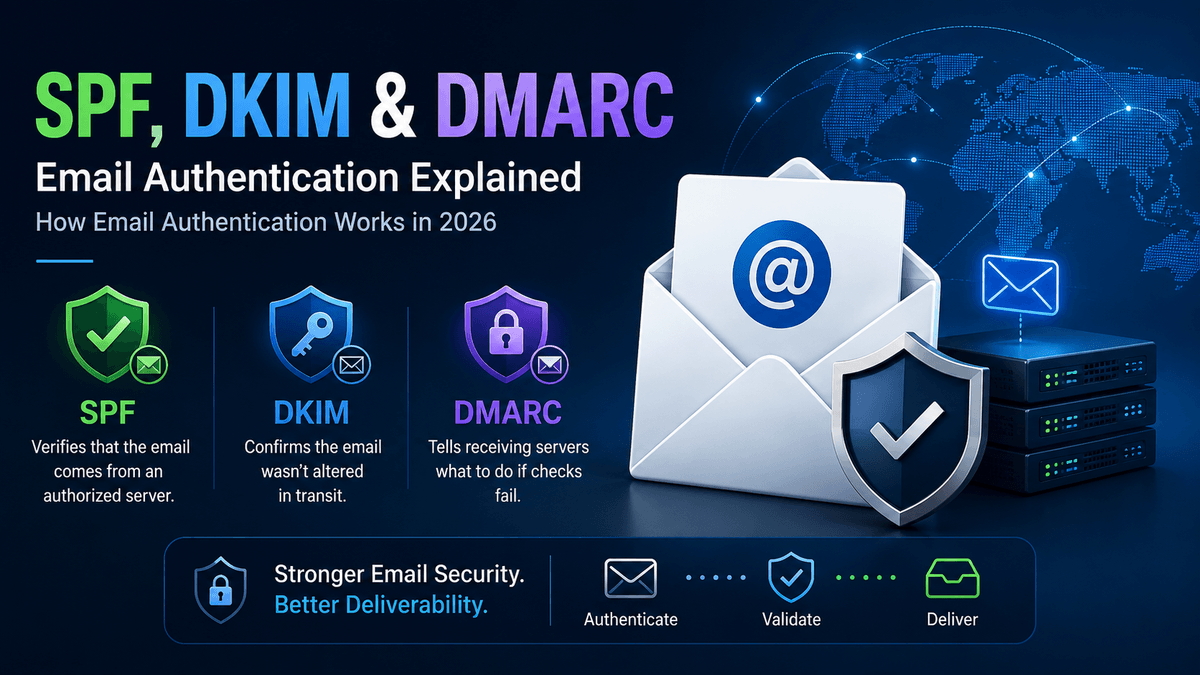
SPF (RFC 7208) answers one question: “is this server allowed to send mail for this domain?” You publish a DNS TXT record listing the IP addresses and third-party services (your email host, your CRM, your marketing platform) authorized to send as your domain. The receiving server checks the connecting IP against that list.
The catch most domains get wrong: SPF allows a maximum of 10 DNS lookups per check. Stack enough include: statements — your email platform, your helpdesk, your marketing tool, your invoicing system — and you silently exceed the limit, at which point SPF fails for everyone, including legitimate mail. Audit your SPF record whenever you add a new sending tool, not just when something breaks.
DKIM — DomainKeys Identified Mail
DKIM (RFC 6376) answers a different question: “was this message altered in transit, and did it really come from where it claims?” Your mail server signs each outgoing message with a private key; the public key sits in a DNS TXT record under a “selector.” The receiving server verifies the signature against that public key — if the message was tampered with en route, or the signature doesn’t match, DKIM fails.
Unlike SPF, DKIM travels with the message itself, so it survives simple forwarding better. The common failure mode: teams set up DKIM for their main mail server and forget every other platform sending on their behalf — DKIM has to be configured separately, with its own selector, on every single sending source.
DMARC — the Policy Layer That Ties Them Together
SPF and DKIM alone don’t stop spoofing of the address a human actually sees. DMARC (RFC 7489) closes that gap: it requires that either SPF or DKIM (ideally both) pass and be “aligned” — meaning they authenticate the same domain that appears in the visible From: address, not just some technical envelope address a recipient never sees. DMARC also tells receiving servers what to do with mail that fails: p=none (monitor only), p=quarantine (send to spam), or p=reject (block outright) — plus where to send aggregate reports (rua=) so you can see what’s failing before you enforce.
The uncomfortable industry number for 2026: global DMARC adoption has climbed past 50%, but the majority of those domains are still sitting at p=none — they’re watching, not protecting. A DMARC record that never graduates past monitoring stops zero spoofing.
BIMI — the Reward for Getting the Rest Right
BIMI (Brand Indicators for Message Identification) is what puts your verified logo next to your emails in the inbox — but it’s gated behind the other three: you need DMARC enforced at quarantine or reject, with SPF and DKIM both properly aligned, before a mailbox provider will show your logo at all. Reported open-rate lifts from BIMI logos run as high as ~39% in vendor data — not guaranteed, but a real incentive to finish the DMARC rollout instead of parking it at p=none indefinitely.
Common Mistakes That Quietly Break Authentication
- SPF over the 10-lookup limit — usually from accumulated third-party
include:entries nobody audits. - DKIM missing on secondary senders — the marketing platform or support desk sending as your domain without its own DKIM selector.
- DMARC alignment mismatches — SPF/DKIM technically pass, but against a different domain than the visible From: address, so DMARC still fails.
- Never leaving
p=none— reports get set up and then nobody reviews them or moves to enforcement. - Forgetting subdomains — a spoofed
mail.yourdomain.comornews.yourdomain.comwith no policy of its own is an open door that DMARC’s subdomain policy (sp=) is meant to close.
Setting This Up Properly
- Inventory every service that sends mail as your domain — mail server, CRM, marketing tool, invoicing, helpdesk.
- Publish one SPF record covering all of them, staying under 10 lookups.
- Configure DKIM with its own selector on every sending source, not just the primary mail server.
- Publish a DMARC record at
p=nonewithrua=reporting turned on — and actually read the reports. - Fix whatever the reports show is failing, then graduate to
p=quarantine, and finallyp=reject. - Once DMARC is enforced, apply for BIMI if brand recognition in the inbox matters to you.
How XgenPlus Helps
XgenPlus ships SPF, DKIM and DMARC support as core administration, not a bolt-on — domain setup, selector management and policy enforcement are handled from the same admin console used for user and mailbox management, across 25+ years of email infrastructure and 50M+ mailboxes. For organizations that need to go a step further than transport-level authentication, XgenPlus also runs an in-house PKI/Certificate Authority for S/MIME — message-level signing and encryption where you control the trust chain, not a third party abroad.
Frequently Asked Questions
Is “Sender ID” the same thing as SPF?
No. Sender ID was a separate, Microsoft-backed authentication proposal from the mid-2000s using a Purported Responsible Address (PRA) check. It never achieved real adoption and the IETF has since classified it as Historic. Modern email authentication runs on SPF, DKIM and DMARC.
Do I need SPF, DKIM and DMARC, or is one enough?
All three, because they answer different questions. SPF checks whether the sending server is authorized; DKIM checks whether the message was altered and cryptographically verifies origin; DMARC checks that SPF/DKIM align with the visible From: address and defines what happens when they don’t. Any one alone leaves a gap the others close.
Why does Gmail keep rejecting my mail even though I have SPF set up?
The most common causes: SPF exceeding the 10-DNS-lookup limit (so it fails silently), DKIM missing on the specific platform that sent that message, or a DMARC alignment mismatch between the authenticated domain and the visible From: address. Since 2024-2025, Gmail and Yahoo also hard-reject non-compliant bulk mail rather than just spam-foldering it.
What does DMARC “p=none” actually protect against?
Nothing, on its own — p=none is monitor-only. It’s a necessary first step (so you can see what would break before you enforce), but a DMARC record parked at p=none indefinitely stops zero spoofing. The protection comes from graduating to p=quarantine or p=reject.
What do I need before I can get BIMI (the logo-in-inbox feature)?
DMARC enforced at quarantine or reject (not none), with SPF and DKIM both properly aligned to your domain, plus a certificate — a Verified Mark Certificate (VMC, requires a registered trademark) for broad support across Gmail, Yahoo and Apple Mail, or a Common Mark Certificate (CMC, no trademark required) for Gmail-only support.
Final Thoughts
Email authentication went from “nice to have” to “mandatory to be delivered at all” in the space of about two years. If your domain is still running on whatever SPF record got copy-pasted years ago, with DKIM on only one sending source and DMARC sitting at p=none since the day it was created, that’s worth fixing before a provider’s enforcement update fixes it for you — by bouncing your mail.
- See XgenPlus’s email security & authentication controls — SPF, DKIM, DMARC and admin-level policy management.
- Go further with S/MIME — in-house PKI/CA for message-level signing and encryption.
- Talk to our team about auditing your current SPF/DKIM/DMARC setup.