A simple CRM that sits next to your XgenPlus email

LeadsDealsCustomersGrowth

Turn the people you write to into leads, drag deals to the finish line, and never lose a follow-up. Sign in with your XgenPlus app code. No new password.

Included with Xgen Enterprise and Enterprise Pro. Nothing to install. The CRM screens are in English.

Drag a deal to the next stage. Drop one in Won and the total counts up.
  • Six stages on one board

    New, Contacted, Meeting, Proposal, Won and Lost. Each column shows how many deals it holds and what they are worth.

  • Move deals your way

    Drag a deal with the mouse, a finger or the keyboard. Each move is saved at once, and Undo fixes a mistake.

  • A small celebration when you win

    The Won column lights up and its total counts up. It is kept calm on purpose, so the fifth win of the day feels as good as the first.

What XgenPlus CRM is

XgenPlus CRM is a simple customer relationship tool for companies that use XgenPlus email. It keeps leads, deals, contacts and follow-ups in one place on a drag and drop pipeline board, and it runs in the browser on a phone, tablet or computer. You sign in at crm.xgenplus.com with your XgenPlus email address and the 6-digit code from the XgenPlus app, so there is no new password. It is included with the Xgen Enterprise and Xgen Enterprise Pro plans, and with Xgen Platinum.

It is made for owners and sales teams of about 2 to 30 people, including field sales teams who work from a phone. It is deliberately simple, not an enterprise suite.

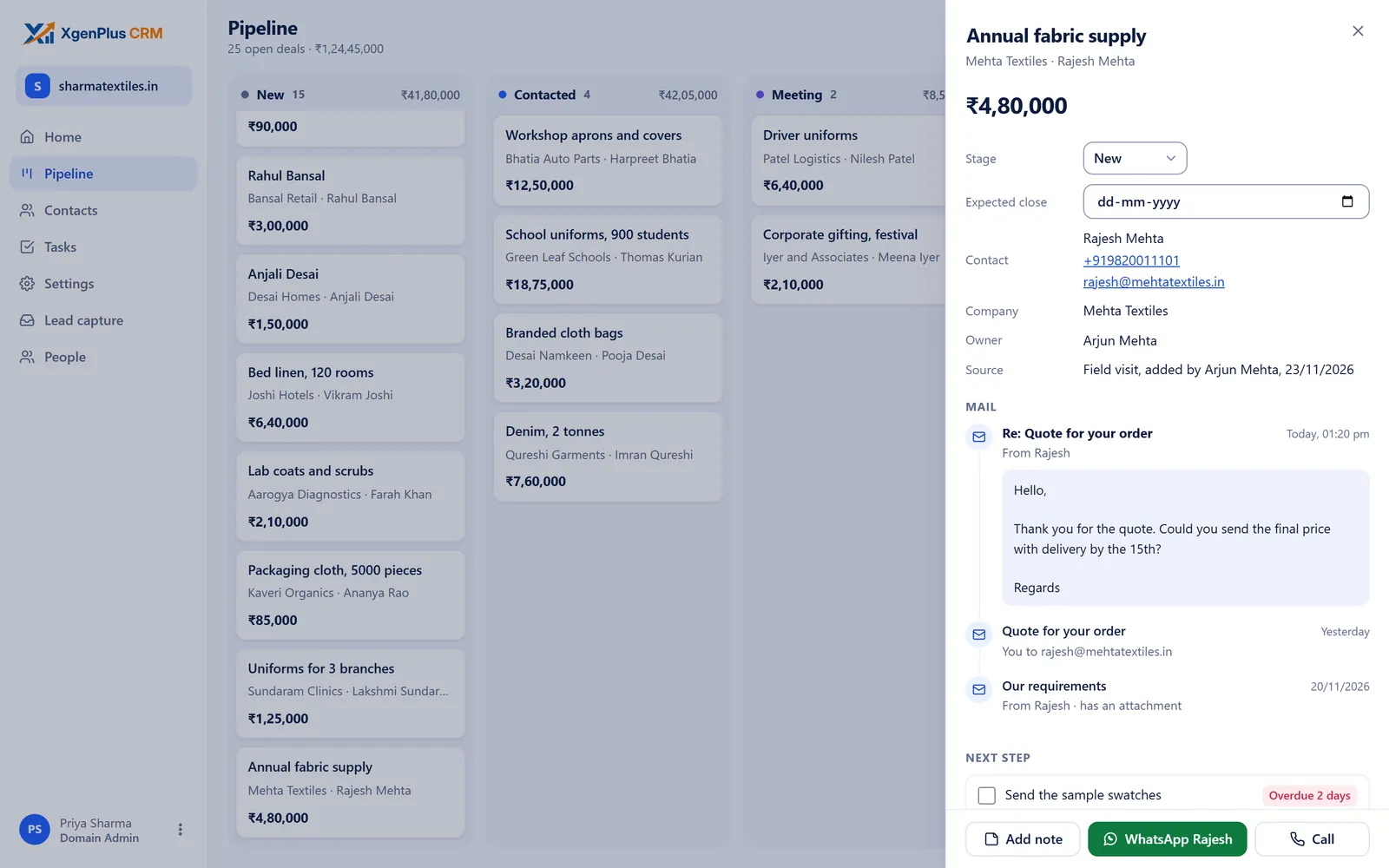
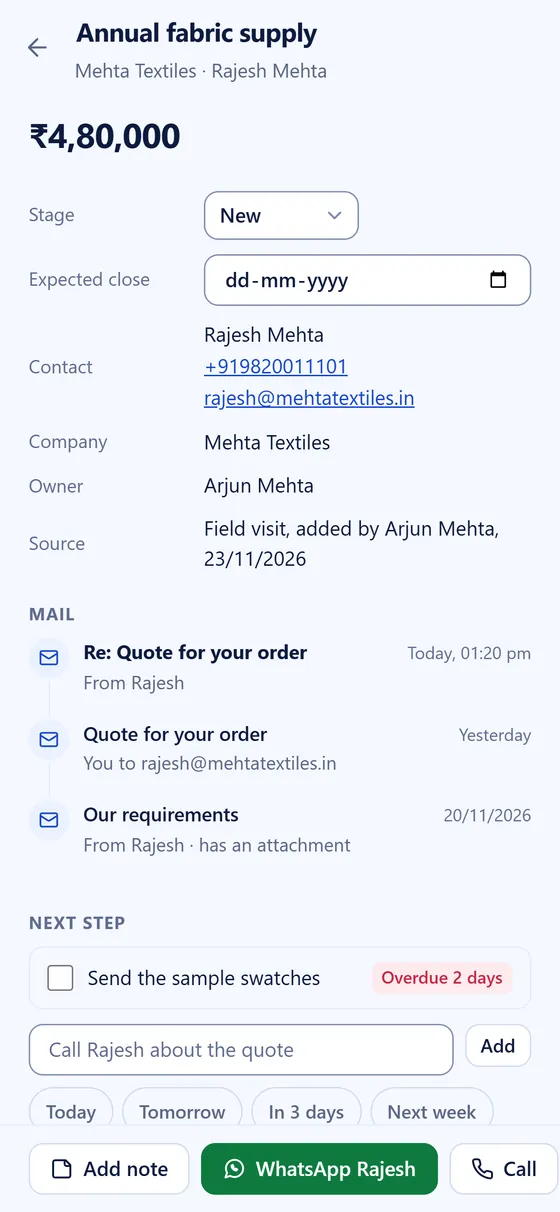
A deal in XgenPlus CRM showing the email conversation with the customer, next steps, and WhatsApp and Call buttons.

Your email and your customers in one place

Connect your XgenPlus mailbox and the emails you have exchanged with a customer appear inside their deal, next to the value, the next step and the buttons to call or open WhatsApp. Connecting is optional. You choose what the CRM may do with your mailbox, and you can switch it off at any time.

The CRM shows these emails. It does not send, delete or move mail.

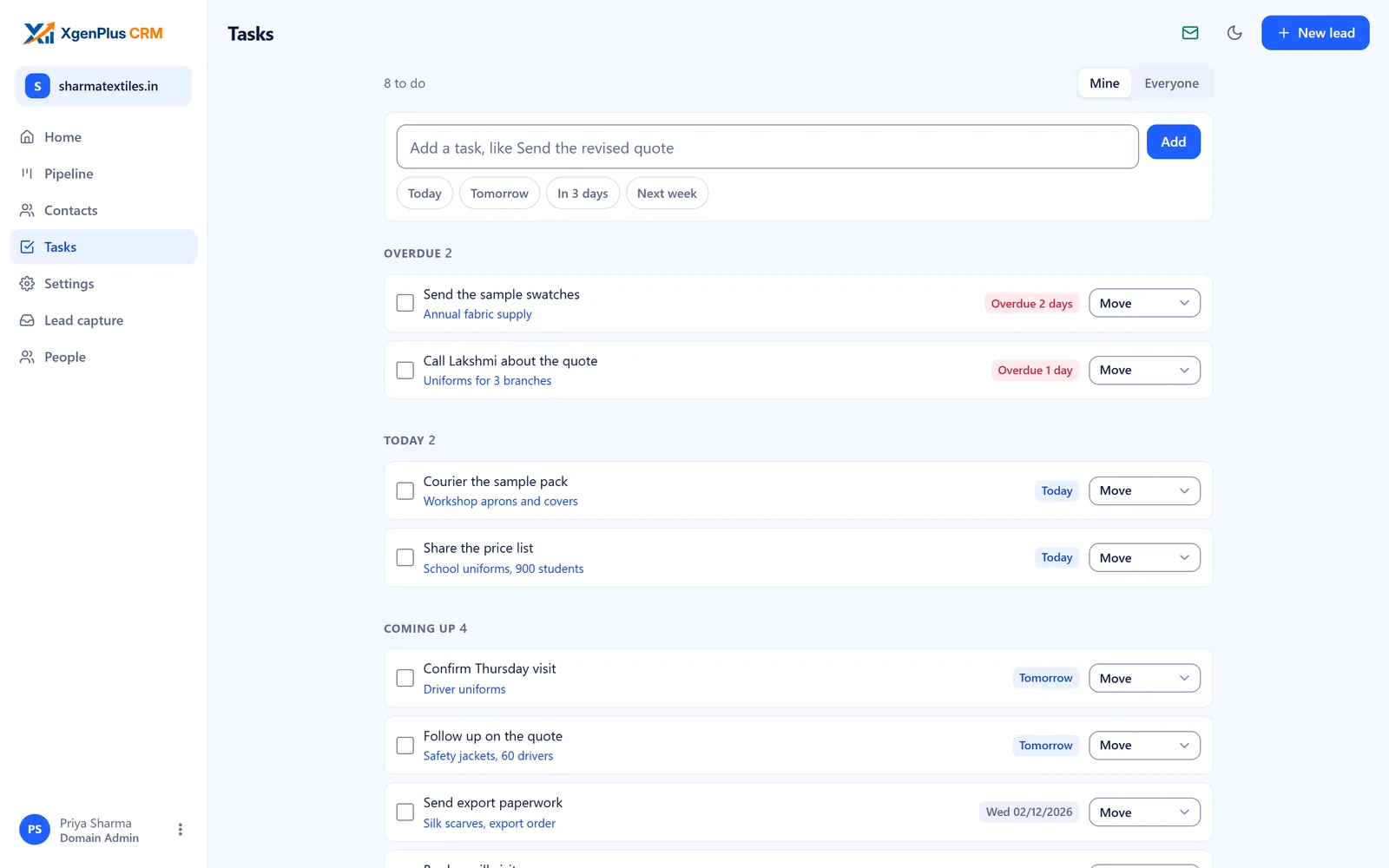
Follow-up tasks grouped by overdue, today and coming up.

Never forget a follow-up

Give a deal a next step and a due date. The Tasks screen groups them as overdue, today and coming up, and each one is linked to its deal.

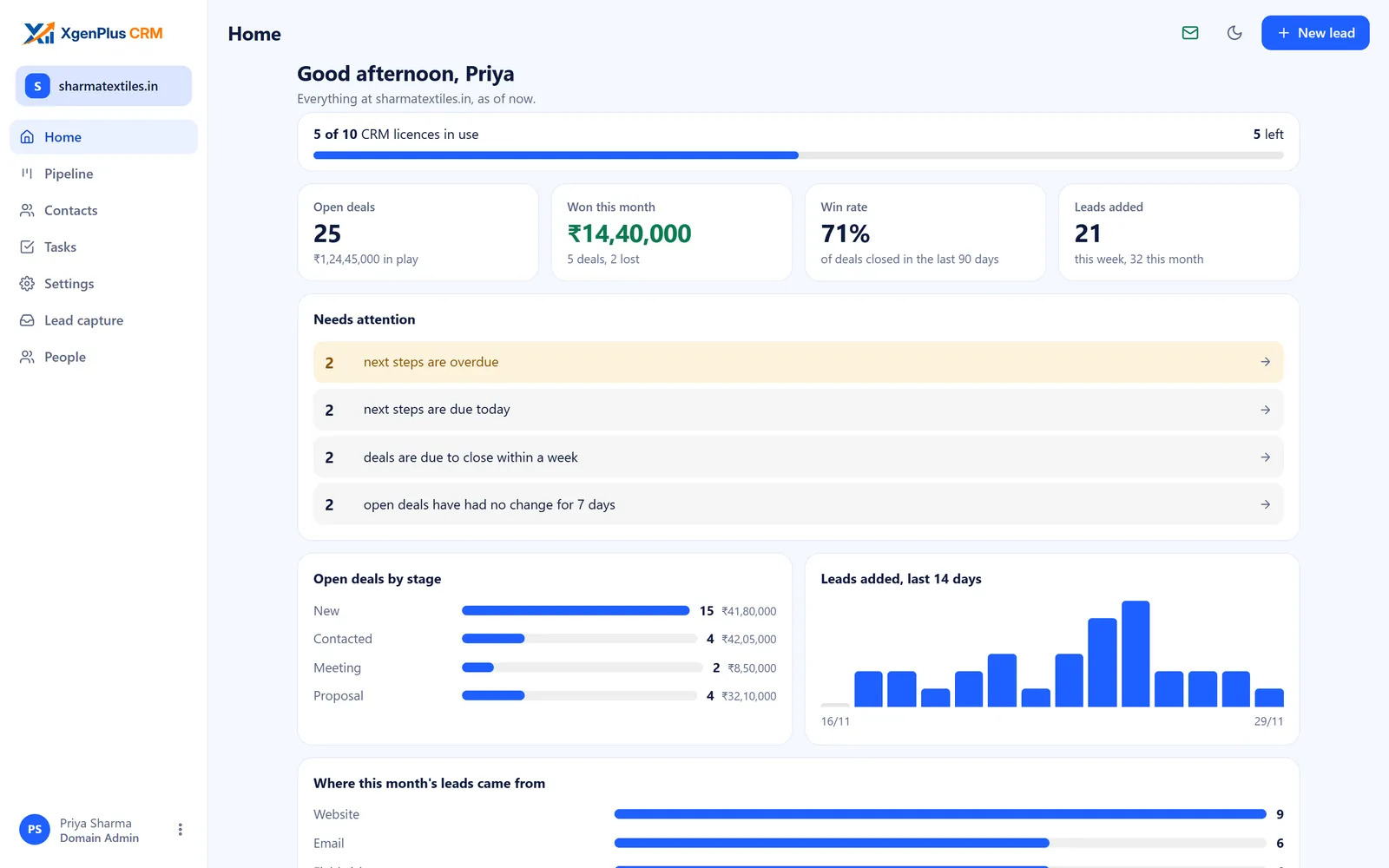
XgenPlus CRM Home: open deals, won this month, win rate, new leads, and what needs attention today.

A dashboard for the owner

Home shows open deals and their value, deals won this month, win rate, new leads this week and a list of what needs attention. You also see deals by stage, leads by day and where leads came from. The Domain Admin sees the numbers for each team member too.

Collect leads from every channel

Every company gets its own lead form and web address. A new lead lands on the board by itself, with where it came from and what the person answered.

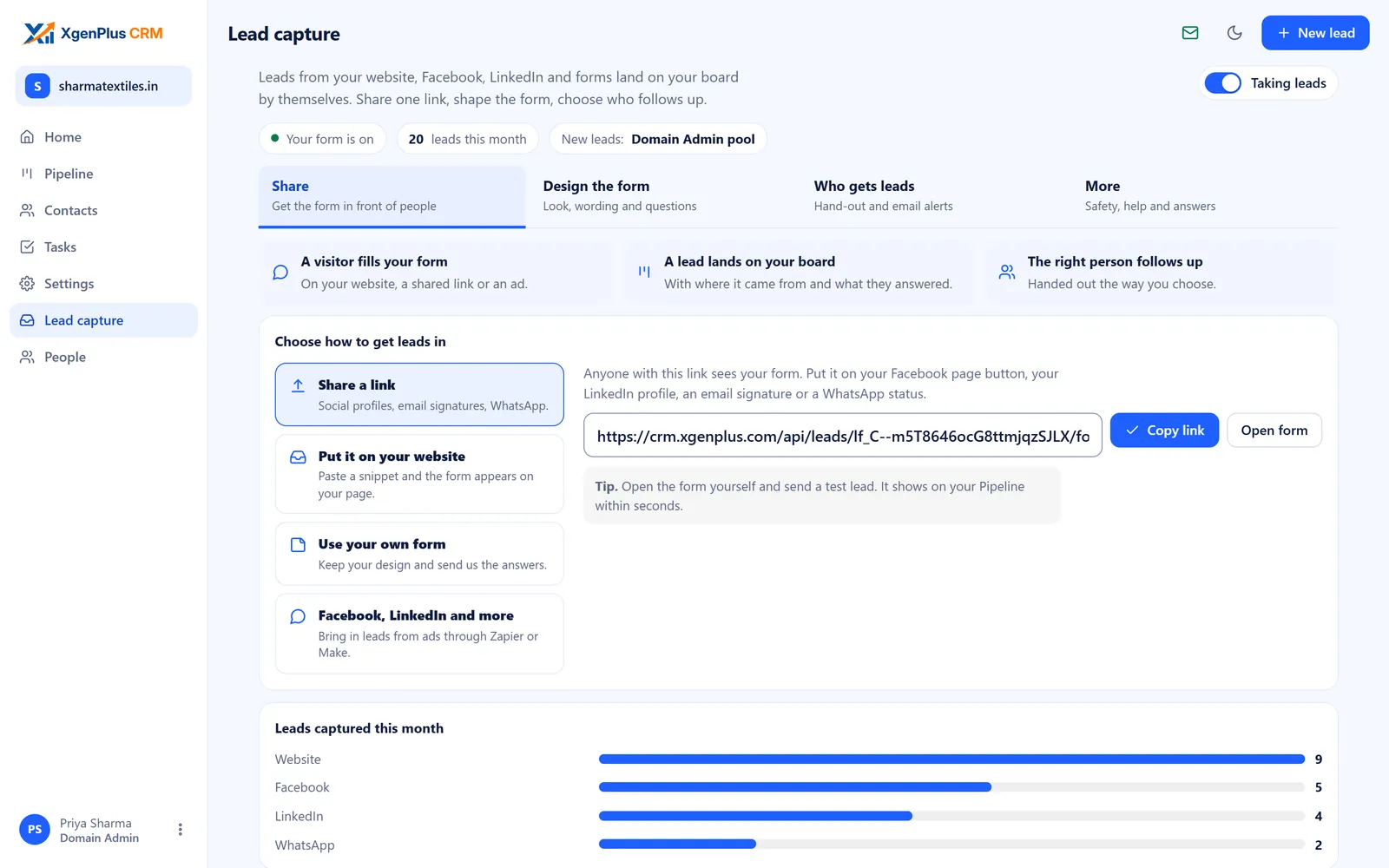
Lead capture page showing ways to collect leads from a link, a website, Facebook and LinkedIn.

Four ways to bring leads in

  • Share the link on your social profiles, in an email signature or as a WhatsApp status.
  • Put the form on your website by pasting a snippet.
  • Keep your own form and send its answers to the CRM.
  • Bring in leads from Facebook, Instagram, LinkedIn and Google ads through Zapier, Make or n8n.

There is no direct Facebook or LinkedIn connection. Those leads come through Zapier, Make or n8n.

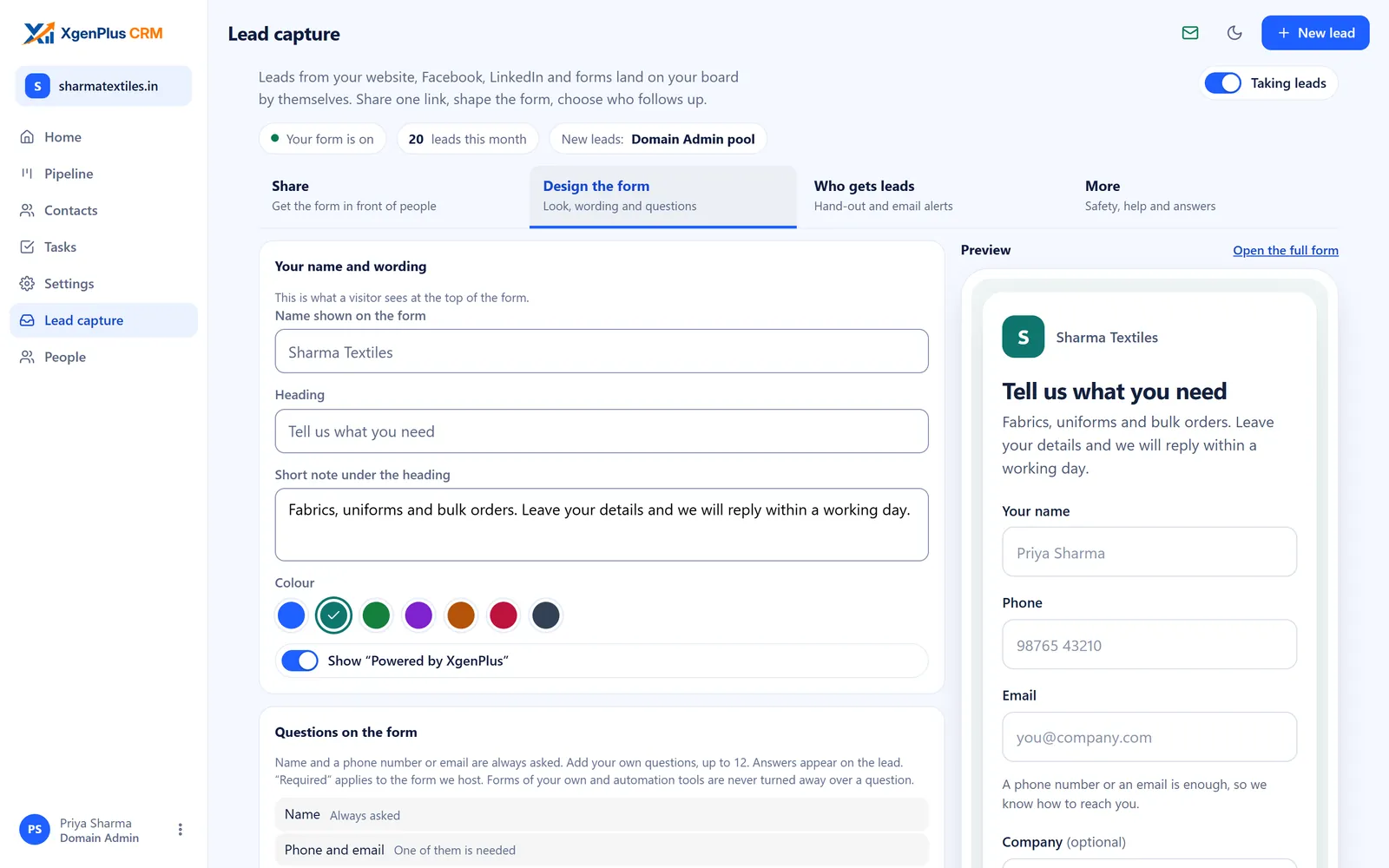
Designing a lead form with a live preview in XgenPlus CRM.

A form that carries your name

Set the name, heading and colour, and ask up to 12 questions of your own. A live preview shows what visitors will see on a phone. The form says Powered by XgenPlus unless you switch that off.

From the form to the board, straight away

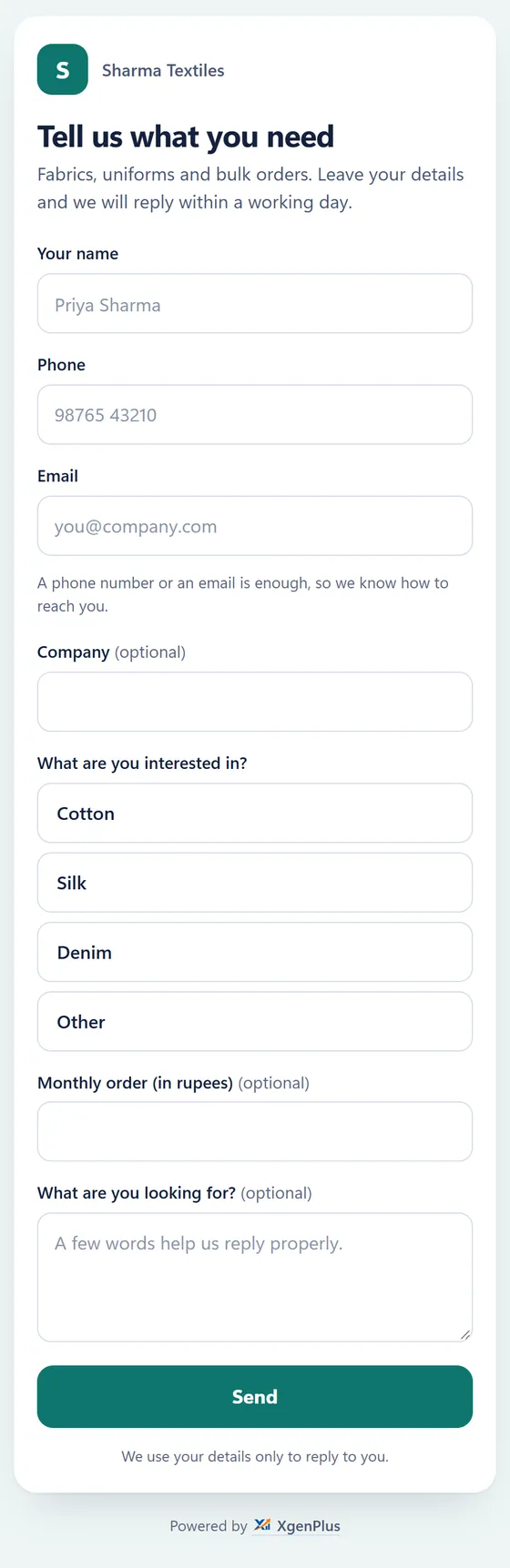
A visitor fills in the form and sees a thank-you page. The new lead is already on your pipeline.

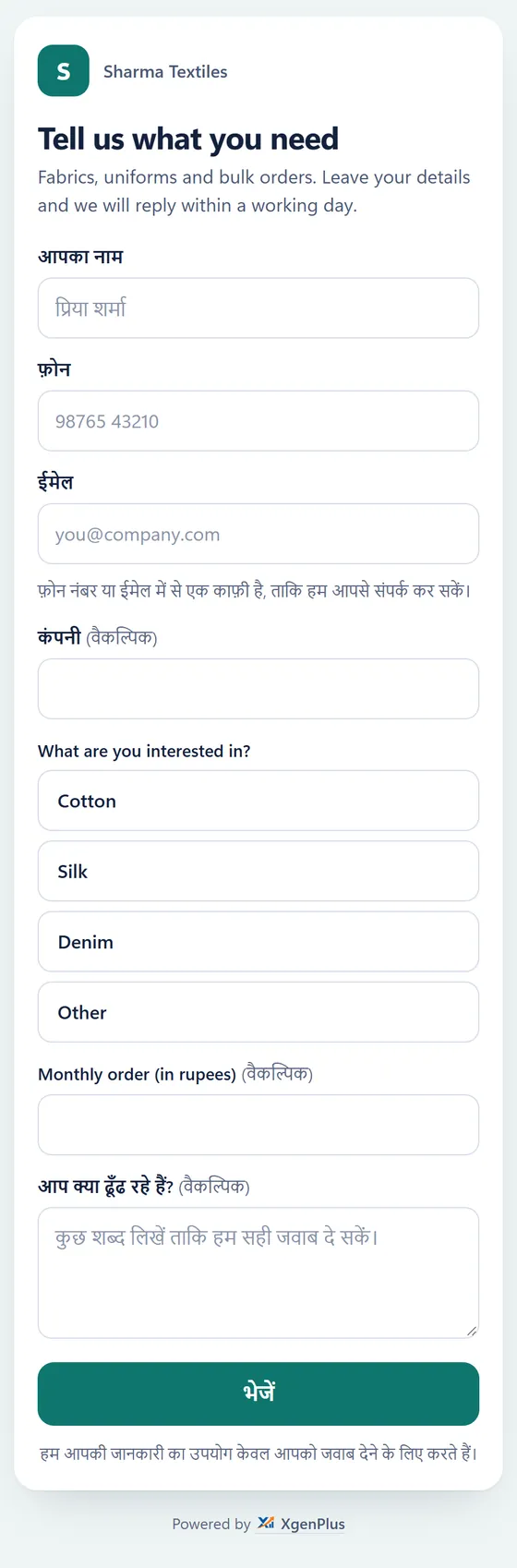
The form speaks English, Hindi, Gujarati and Bengali. Questions you write yourself appear the way you typed them.

A web lead form built with XgenPlus CRM, shown on a phone.
The form in English
Lead form shown in Hindi.
The same form in Hindi
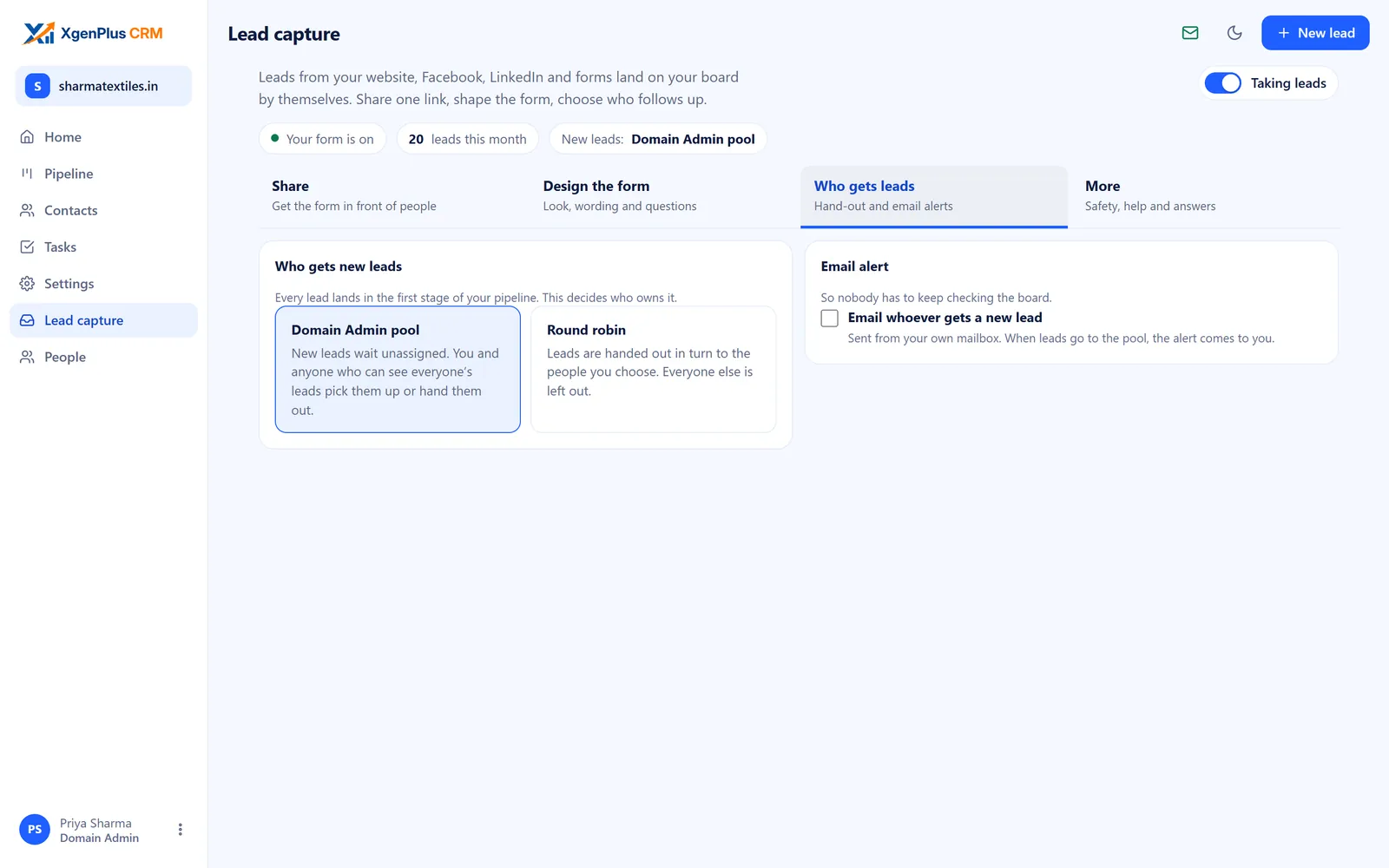
Choosing who gets new leads: admin pool or round robin, with email alerts.

Leads go to the right person

Send new leads to the admin pool to hand out, or share them in turn (round robin) among the people you choose. You can also email whoever gets the lead. If the same person writes twice, they are not added twice.

Built for people in the field

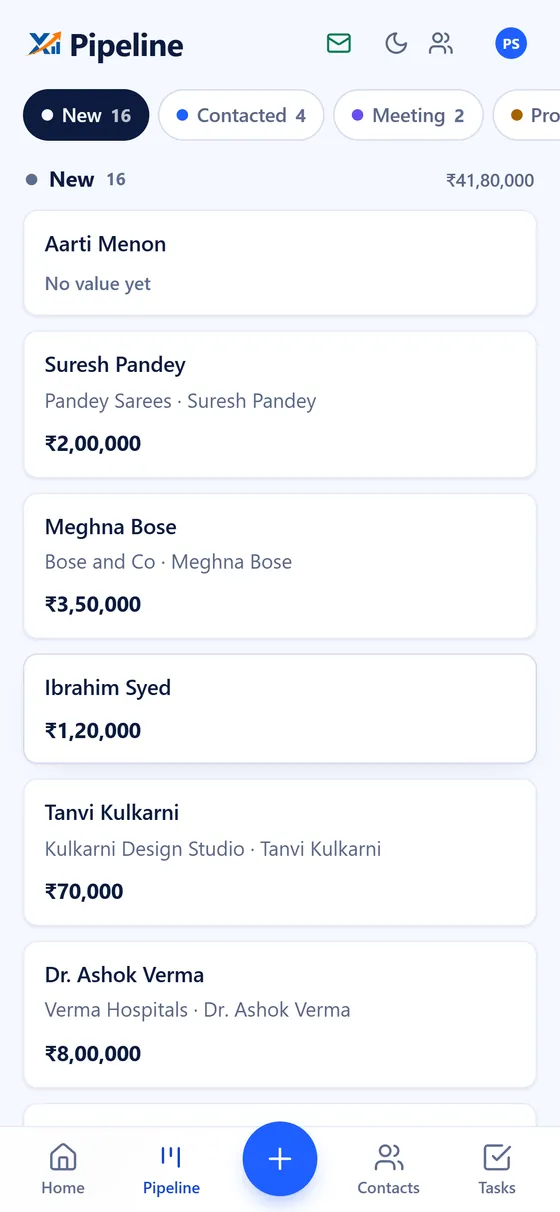
Your sales team can add a lead from a phone in seconds, between two visits.

  • A name and a phone number is enough to save a lead.
  • No signal? The lead is kept on the phone and syncs by itself later.
  • After saving, tap to call or to open the chat in WhatsApp.
  • A duplicate guard warns you if the person is already in the CRM.

There is no separate mobile app to install. XgenPlus CRM runs in the phone browser.

XgenPlus CRM pipeline on a phone.
A deal opened on a phone in XgenPlus CRM.

You stay in control

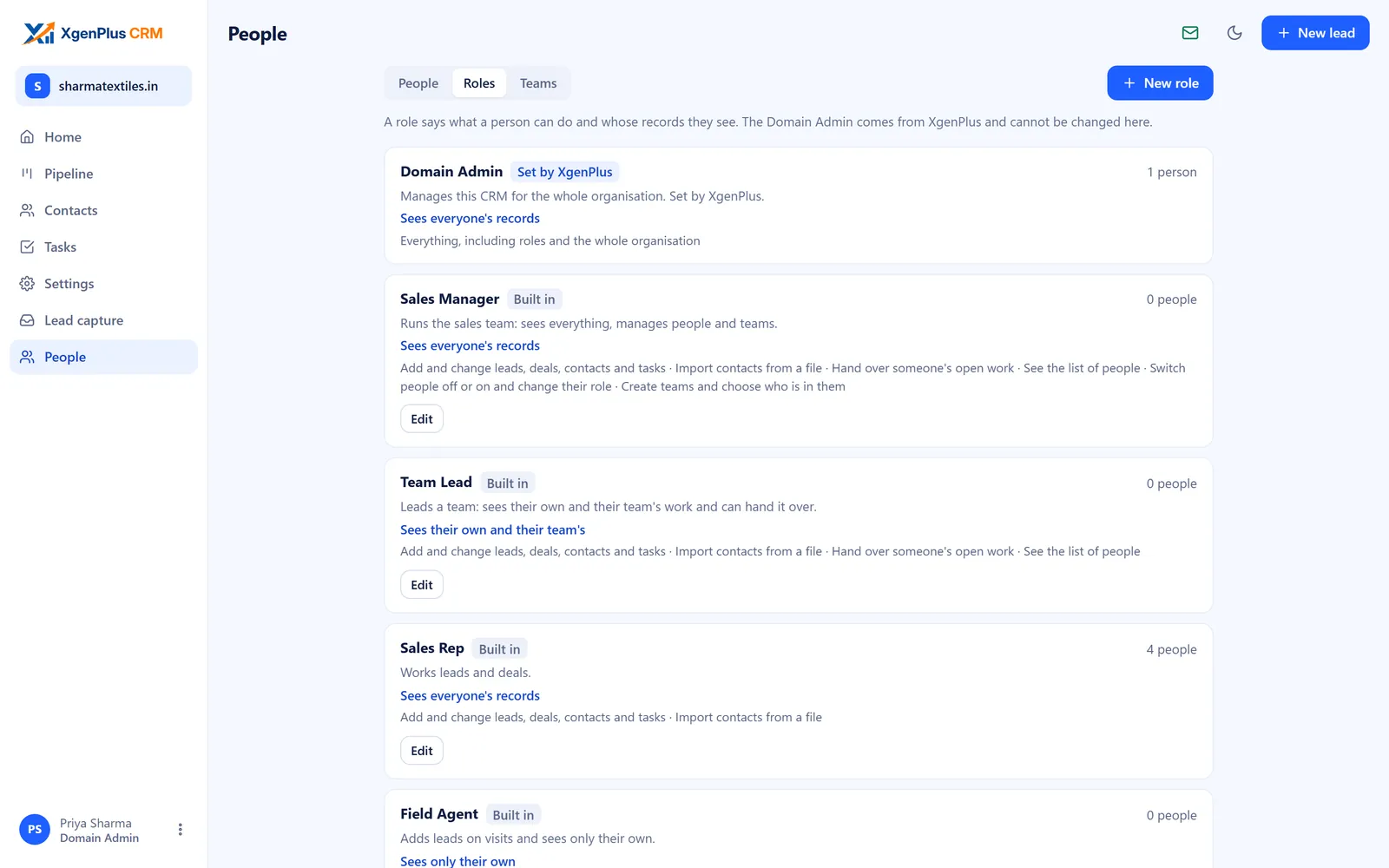
Roles in XgenPlus CRM and what each role can do.

Roles and teams

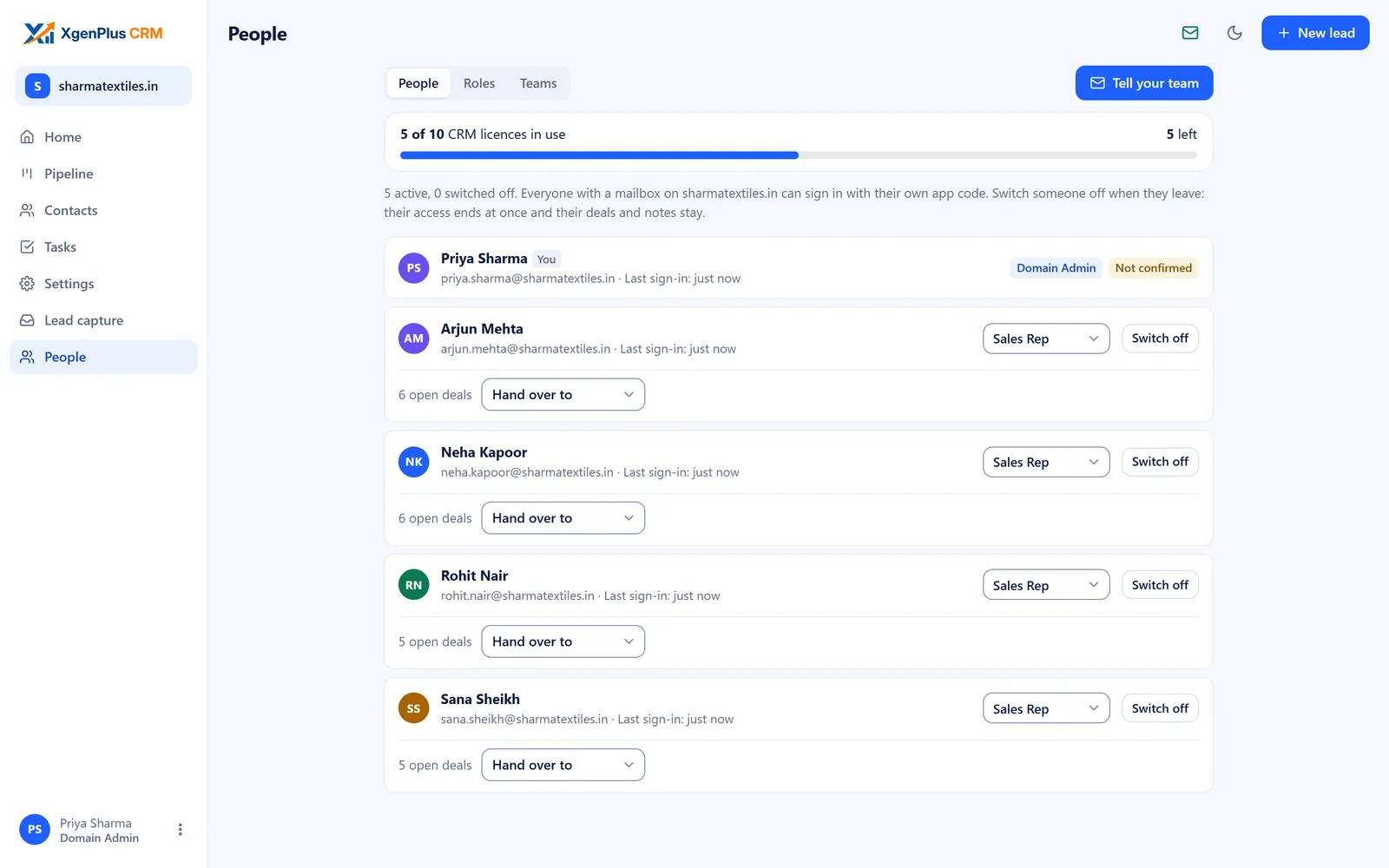
Use the built-in roles (Domain Admin, Sales Manager, Team Lead, Sales Rep, Field Agent and Viewer) or make your own. Group people into teams with team leads. When someone leaves, switch them off: their access ends at once, and you can hand their open deals to a colleague.
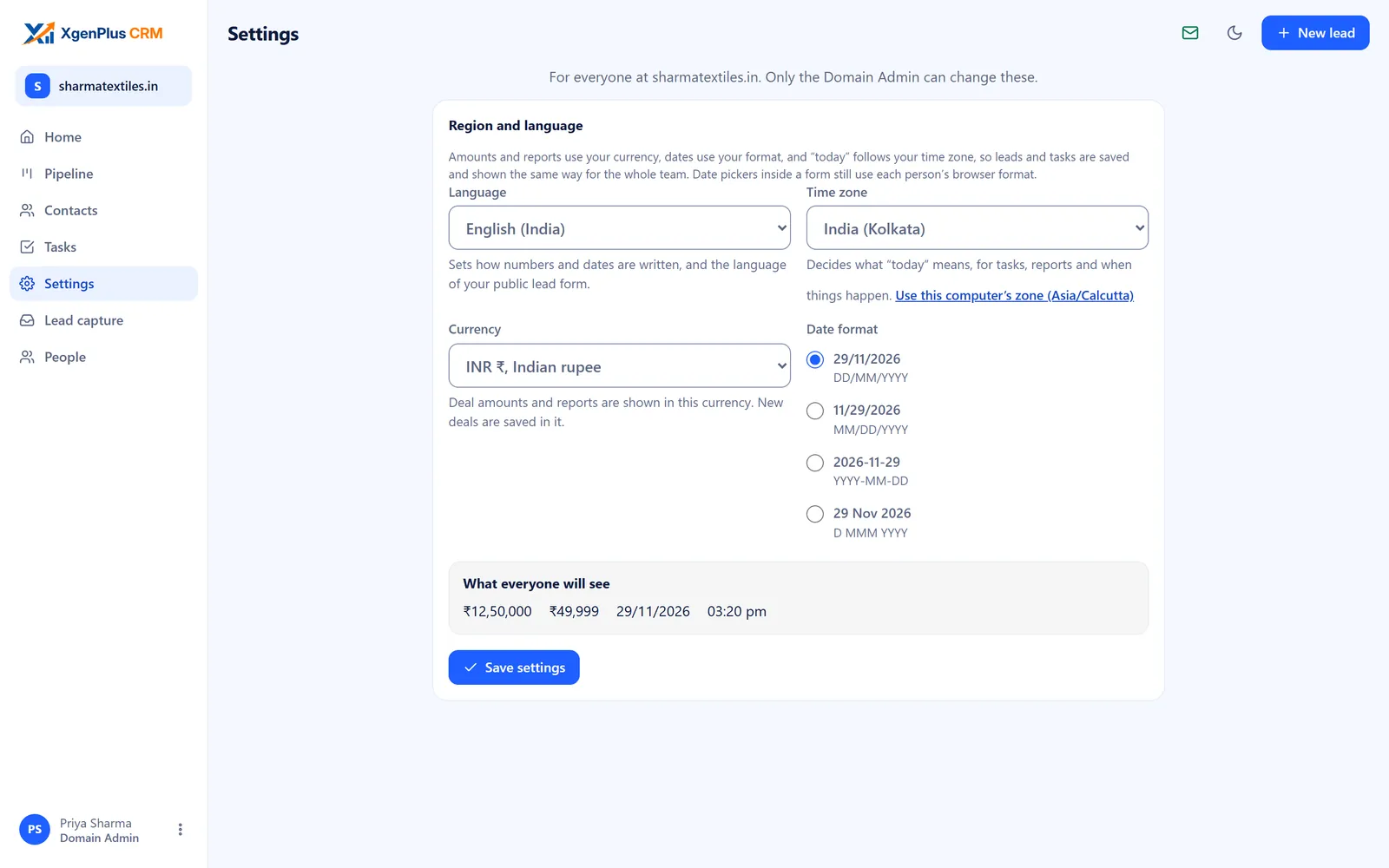
Region settings: language, time zone, date format and currency.

Made for your region

The Domain Admin sets language, time zone, date format and currency once for everyone. Rupee, dollar, euro, pound, dirham and more are there, so amounts and dates read the way your business works.

  • Each company sees only its own data
  • Import contacts from a spreadsheet
  • Light and dark mode
  • Fully usable with a keyboard

How to start

It takes about a minute, and there is nothing to install.

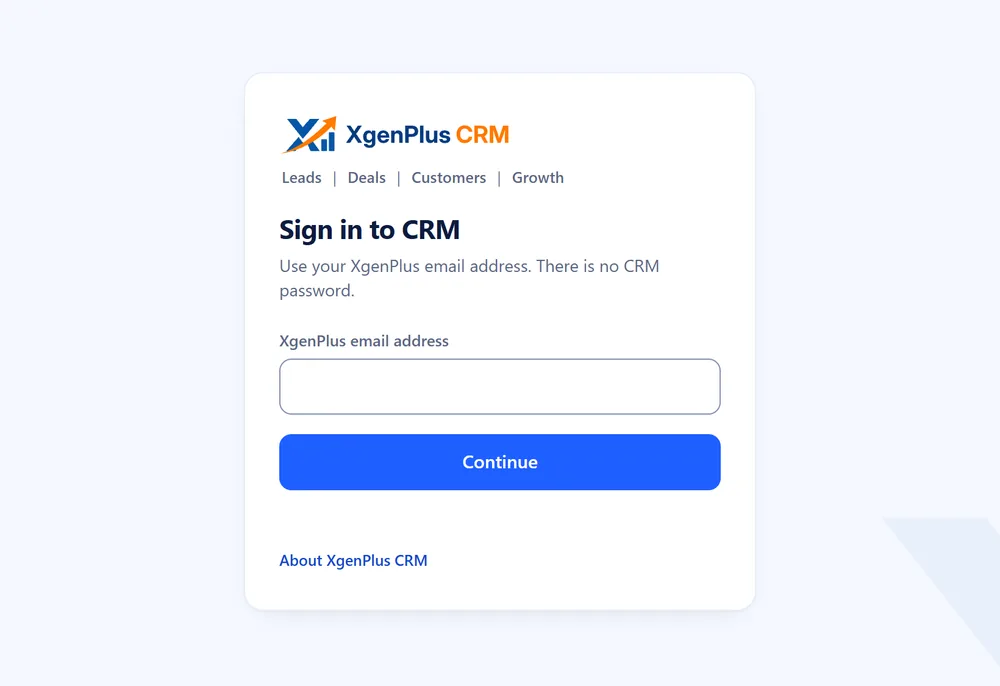
XgenPlus CRM sign-in page.
  1. Open the CRM

    Go to crm.xgenplus.com/app and enter your XgenPlus email address.

  2. Enter your app code

    Type the 6-digit code from the XgenPlus mobile app (Web Login, then TOTP). There is no CRM password to remember.

  3. The Domain Admin goes first

    The Domain Admin of the company signs in first and sets up the CRM. After that, colleagues on the same XgenPlus domain sign in the same way.

  4. Tell your team

    The Domain Admin can use Tell your team to email colleagues that the CRM is ready, and can set region, lead capture and roles from Settings.

  5. Connect your mailbox (optional)

    Use the mailbox icon to connect your XgenPlus mailbox and see emails inside deals.

Want the steps with pictures? Read the XgenPlus CRM guide in our Help Center.

Included with Xgen Enterprise and Enterprise Pro

XgenPlus CRM is included with the Xgen Enterprise and Xgen Enterprise Pro plans, and with Xgen Platinum. There is nothing to buy or install separately.

The number of people who can use it follows the number of Xgen Enterprise and Enterprise Pro licences on your domain. The Domain Admin always sees how many are in use and how many are left.

On another plan? Ask your Domain Admin about moving to Xgen Enterprise.

See the XgenPlus plans
People and roles in XgenPlus CRM, with a CRM licence counter.

What is not there yet

XgenPlus CRM is deliberately simple. These things are not available today.

  • WhatsApp messaging inside the CRM. The WhatsApp button opens the chat in WhatsApp on your phone or computer.
  • Writing and sending email to customers from a deal, scheduled emails, email sequences and bulk campaigns.
  • An automation builder, forecasting, and custom reports beyond the Home dashboard.
  • A separate mobile app. It runs in the phone browser and works well there.
  • CRM screens in languages other than English. The public lead form is in English, Hindi, Gujarati and Bengali, and amounts and dates follow your region settings.
  • Direct Facebook or LinkedIn connections. Leads from those come through Zapier, Make or n8n.

XgenPlus CRM, answered

Who can use XgenPlus CRM?

Companies on the Xgen Enterprise and Xgen Enterprise Pro plans, and on Xgen Platinum. The Domain Admin signs in first, then colleagues on the same domain. The number of people who can use it follows the number of Xgen Enterprise and Enterprise Pro licences on the domain.

Do I need a new password?

No. You sign in with your XgenPlus email address and the 6-digit code from the XgenPlus app.

Does the CRM read my email?

Only if you connect your mailbox, which is optional. Then it shows your emails with a contact inside their deal. You decide what it may do and can switch it off any time.

Can I collect leads from my website, Facebook or LinkedIn?

Yes. Every company gets a lead form and web address. Facebook, Instagram, LinkedIn and Google leads come in through Zapier, Make or n8n.

Can my team use it on phones?

Yes, in the phone browser. Adding a lead works even without a signal and syncs later.

Is our data separate from other companies?

Yes. Each company sees only its own data.

Which languages and currencies?

The CRM screens are in English. The lead form is in English, Hindi, Gujarati and Bengali. Currency, date format and time zone are chosen by your Domain Admin, with more than 15 currencies.

What happens when someone leaves?

The Domain Admin switches them off, their access ends at once, and their open deals can be handed to a colleague.

What is not there yet?

You cannot send WhatsApp messages or email from inside the CRM. There is no automation builder, no forecasting and no separate mobile app. The CRM screens are in English only. Facebook and LinkedIn leads come through Zapier, Make or n8n, not through a direct connection.

Need help? Support for XgenPlus CRM is the same as for your XgenPlus email.

Bring your customers next to your email

Sign in with your XgenPlus email address and the code from the XgenPlus app.

Read the announcement on our blog